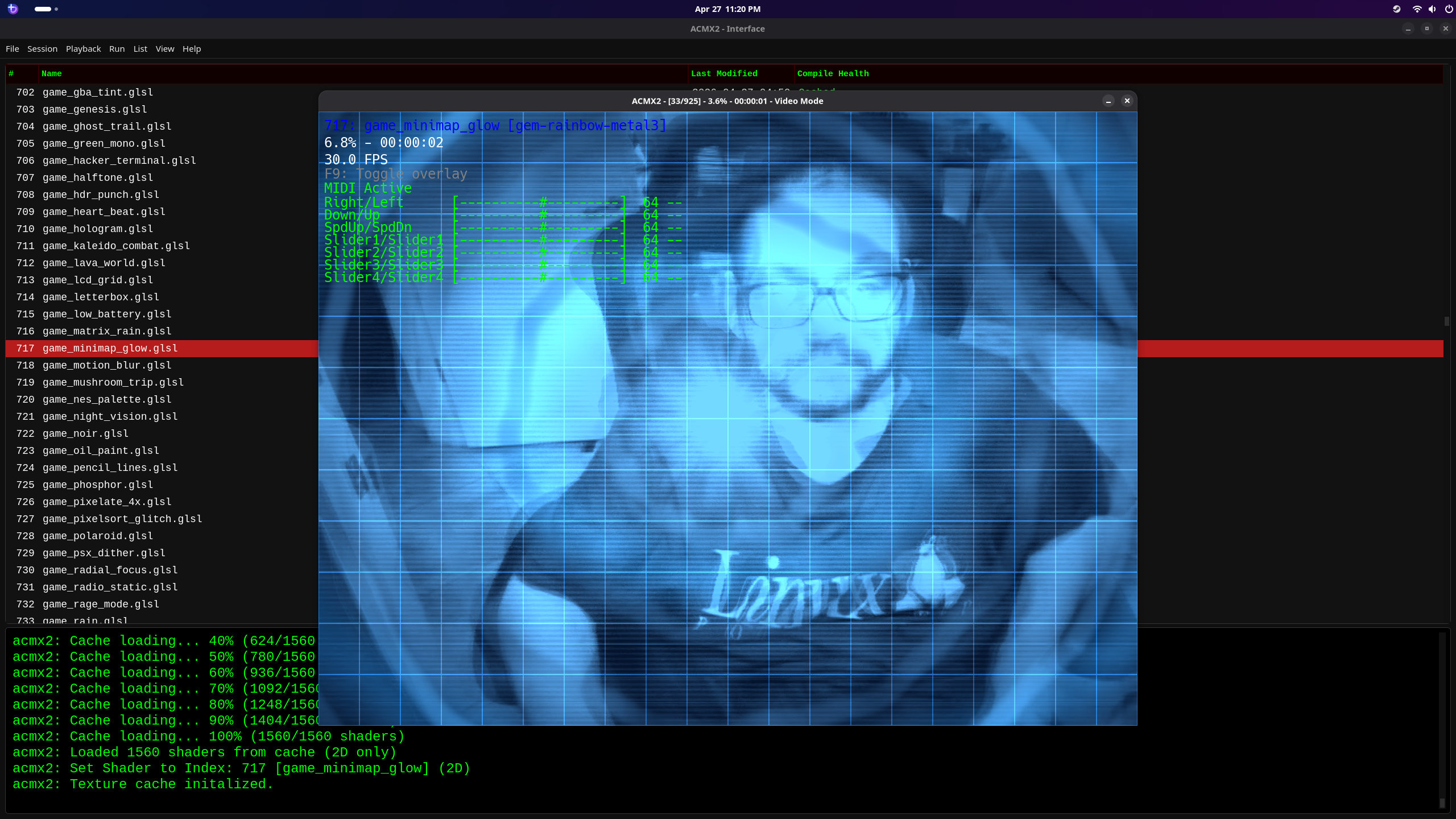

Introduction
ACMX is a high-performance, real-time video synthesis and glitch-art workstation with one Qt interface and two GPU rendering backends. The mature ACMX2 backend uses libmx2 and OpenGL. The newer ACMXVK backend uses MXVK and Vulkan, including mixed fragment/compute SPIR-V pipelines, HDR video, and recorded headless processing. Both paths share the central workflow for media selection, shader libraries, multipass effects, playlists, audio/MIDI control, live editing, snapshots, and recording.
See ACMXVK Vulkan Backend for a structured overview of the Vulkan backend, its architecture, shader ABI, library builder, media clocks, HDR and headless paths, portability, and current implementation status.
See Deep Dream for the complete CUDA LibTorch Deep Dream guide, including model export, every runtime control, Qt interface operation, performance, recovery behavior, and explicit build instructions.
The optional acidcam-gpu library can offload complex glitch filters to NVIDIA GPUs through CUDA. ACMX2 uses it with the OpenGL pipeline, while a compatible ACMXVK/MXVK build can keep decoded, filtered, history, and uploaded frames resident across CUDA and Vulkan.
CUDA acceleration is a compile-time option (-DWITH_CUDA=ON/OFF, default ON). The project now uses OpenCV 5. When CUDA is enabled, OpenCV 5 must be compiled with CUDA support. When disabled, the engine builds against stock OpenCV 5 and runs the full GLSL/SDL2 shader pipeline without the CUDA GPU-filter stack — see Optional Build Features (CUDA / Audio / MIDI) and Building without CUDA (pure OpenGL build).
- Warning
- Installing the NVIDIA CUDA toolkit alone does not add CUDA support to an existing OpenCV installation. For WITH_CUDA=ON, OpenCV itself must be compiled with CUDA enabled and provide the CUDA modules used by ACMX2, including cudaimgproc. On Arch Linux, install opencv-cuda instead of the stock opencv package. On other distributions, use an equivalent CUDA-enabled OpenCV package or build OpenCV with CUDA enabled.
Rendering Backends
Choose the renderer from the Qt interface's Backend menu:
| Backend | Graphics API | Shader workflow | Best fit |
|---|---|---|---|
| ACMX2 | OpenGL / libmx2 | Runtime GLSL fragment and compute shaders | Existing ACMX2 libraries and mature compatibility |
| ACMXVK | Vulkan / MXVK | Manifest-based source compiled to SPIR-V | Explicit Vulkan pipelines, HDR, headless recording, and modern fragment/compute chains |
ACMX2 and ACMXVK are separate executables supervised by the same interface. Changing the backend changes the rendering implementation and shader format; it does not change the basic creative workflow.
Overall Project Status
ACMX 2.139.0 packages the shared interface, ACMX2, ACMXVK, and MIDI mapping tool as one evolving project. ACMX2 remains the established OpenGL engine. ACMXVK has completed its six-increment HDR path and implements camera/video/ image input, fragment and compute multipass, playlists and crossfades, texture and FFT history, custom uniforms, audio/MIDI control, 3D model texturing, recording, snapshots, live shader rebuild/reload, and surface-free headless recording. Vulkan shaders require the ACMXVK descriptor ABI and SPIR-V build workflow; legacy ACMX2 GLSL is not automatically interchangeable. Optional Stable Diffusion processing keeps one local sd-server model loaded for image-to-image frames, LoRAs, and server-side ESRGAN. A separate ESRGAN-only mode can upscale frames before the Vulkan shader chain without loading a diffusion model.
The project currently targets native Linux, macOS/Apple Silicon through MoltenVK, and Windows. Portable builds do not require CUDA. CUDA acceleration, OpenCV DNN, audio, MIDI, TIFF, and WebP remain optional build features. Driver, codec, camera, and hardware combinations continue to be tested and hardened.
Download the ACMX Flatpak
The portable Linux build includes the Qt interface, ACMX2 and ACMXVK engines, RtAudio, MIDI support, shader resources, and a Vulkan-enabled stable-diffusion.cpp sd-server without requiring NVIDIA CUDA. Users supply their own Stable Diffusion, LoRA, and ESRGAN model files. Download it from the ACMX Linux Flatpak release page. The current bundle is ACMX v2.139.0 (71,566,960 bytes; 69 MiB) with SHA-256 e79efcb7eaf23431422820617c8a73591f93288077e1bf9ae6f516fcd53cb2ab.
First Run: Qt Interface and Texture Cache
The Qt launcher persists these choices, so the initial setup normally needs to be completed only once:
- Open File > Properties. Confirm that Executable Path points to the acmx2 binary (the default acmx2 works when it is in PATH), select a shader directory containing library.json or the legacy index.txt, and choose the snapshot output directory. library.json is the preferred manifest.
- Open Session > Session Properties and select the input mode, input device or file, capture resolution, FPS, and window resolution. A fresh configuration defaults to a 1280x720 camera input and Default window resolution.
- For current texture-history shaders, enable Texture Cache first and then Use sampler2DArray history. The array control maps to –texture-cache-array and remains disabled until Texture Cache is checked.
- Keep Cache Size at the default of 8 for the normal shader pack, or select 1 through 64 frames when a shader needs another history depth. Cache Delay is the number of frames skipped before the next history update: the UI default of 1 updates the cache every second frame, while larger values spread the history farther apart in time. Increasing the cache depth increases GPU-memory use, particularly at high resolutions.
- After installing or updating a shader pack, choose Playback > Remove Broken if shaders fail on the current OpenGL driver. ACMX2 compile-checks every entry, removes failing entries from the selected manifest, backs up the original as library.json.bak or index.txt.bak, and reloads the list. Shader source files are not deleted.
Starting with v2.9.1, the launcher identifies shaders by their exact path relative to the selected library rather than by the displayed row number. Initial and live selections, multipass stages, and playlists therefore keep loading the named effect if the manifest is sorted or filtered. Compute shader entries remain in library.json; systems without the required OpenGL support retain them as stable passthrough slots. Legacy numeric commands and older playlist stem names remain supported.
The maintained shader collection uses the sampler2DArray history interface for current cache effects. Without both texture-cache settings, one of these shaders may fail to compile or appear not to apply. Legacy shaders using samp1...samp8 or textures[SIZE] use Texture Cache with array mode disabled. On non-macOS systems, Playback > Rebuild Shader Cache can precompile variants after the cache size or array mode is changed. The rebuild window remains responsive and shows the ACMX2 logo and compile progress. Playback > Clean Shader Cache deletes all cache variants for the selected library without rebuilding them. macOS compiles shader source at runtime because persistent program-binary caching is unavailable there, so both cache maintenance actions are hidden.
Purpose & Vision
The original project brought a massive library of "glitch" filters to digital artists. However, as resolutions climbed to 4K and filter stacks became more complex, CPU-based processing hit a bottleneck.
acidcam-gpu solves this by:
- Parallelizing the Chaos: Using custom CUDA kernels to process millions of pixels simultaneously (when built with -DWITH_CUDA=ON; otherwise the engine falls back to the GLSL/SDL2 shader pipeline only).
Tech Stack
- Language: C++20
- Computer Vision: OpenCV 5
- Parallel Computing: NVIDIA CUDA (Optimized for RTX 2070)
- Graphics API: OpenGL / SDL (Hardware-accelerated rendering)
- Format Support: Native MX2 MXMOD 3D model parsing for real-time geometry glitching.
Why NVIDIA & CUDA?
When built with CUDA support enabled (the default on Linux), this project leverages the NVIDIA ecosystem for:
- Shared Memory: Fast on-chip memory to speed up neighborhood-based filters.
- Massive Throughput: Harnessing thousands of CUDA cores to apply multiple glitch layers in a single pass.
CUDA support is a compile-time option (-DWITH_CUDA=ON/OFF) and is automatically disabled on macOS. See Optional Build Features (CUDA / Audio / MIDI) and Building without CUDA (pure OpenGL build) for building without CUDA on systems that lack an NVIDIA GPU.
Project Goals
- Zero-Copy Interop: High-speed texture sharing between CUDA and OpenGL.
- Visual User Interface: Simple to use User interface.
- Command line tool: Command line tool.
Features
- Camera, video, or image input with configurable resolution
- Shader library — load a single fragment shader or a directory using library.json when present, with index.txt as a fallback
- Filename-stable shader selection — initial selection, live Qt changes, multipass chains, and playlists resolve exact library-relative filenames, preventing list order or filtered entries from selecting a different effect
- Shader Library Builder — combine individual .glsl and .comp files or recursively scanned folders, keep the list sorted, and export a self-contained library.json library from the Qt List menu
- OpenGL compute shaders — run full-frame .comp passes on Linux with OpenGL 4.3 or newer, including compute/fragment libraries, playlists, multipass chains, temporal history effects, and persistent binary caching
- CUDA GPU filters — apply GPU-accelerated pixel filters in addition to shaders
- 3D mode — render shaders onto a 3D model (.mxmod)
- Multipass shaders — chain multiple shader passes in a single frame
- Random multipass mode — generate random 1–5 shader chains on the fly with crossfade transitions; navigate the main shader while in random mode
- Shader playlists with named nodes — organize shaders into named tree nodes; each node loads its shaders into the multi-pass pipeline when selected at runtime
- Audio reactivity — shaders respond to real-time audio input (RtAudio/PulseAudio)
- Audio startup warmup control — –audio-warm-rate <value> controls startup fade-in rate for audio-reactive uniforms/textures (default 0.5 1/sec)
- Audio spectrum history array — –enable-audio-buffers <N> exposes rolling FFT history through one runtime-sized sampler1DArray spectrum_history; the former spectrum1...spectrumN sampler interface is no longer used
- File-based audio reactivity — drive audio-reactive shaders from an audio or video file instead of a live microphone via –audio-file; file-mode recording and muxing use explicit opt-in semantics
- MIDI control — map hardware knobs and buttons to shader parameters
- FFmpeg CUDA video decode — file input prefers FFmpeg hardware decode on CUDA, with automatic fallback when unavailable
- Video recording with optional audio muxing via FFmpeg
- Expanded output container support — includes MKV output support in addition to the existing MP4 workflow
- Up to 8K recording support — 4K and below records as H.264; above 4K records as HEVC (H.265)
- Hardware-first H.264 encoding — prefers h264_nvenc via MXWrite and falls back to software H.264 automatically
- Configurable recording quality — preset, tune, CRF, codec mode, realtime low-latency flags, and arbitrary FFmpeg-style encoder parameters are available in both CLI and Qt session settings
- Lossless HEVC/NVENC output — select hevc_nvenc, NVENC p1...p7 presets, lossless tuning, and options such as -profile:v rext -pix_fmt yuv444p through MXWrite
- Pipeline mode reporting — startup log prints active decode/encode modes for validation and benchmarking
- Color-coded terminal status output — improves readability when monitoring long-running headless jobs
- Silent mode — headless video processing without a window
- HDR video pipeline — detects BT.2020 PQ/HLG sources, processes them in linear BT.2020, and writes HDR HEVC Main10 output
- HLG to HDR10 conversion path — improves interoperability across HDR source and export workflows
- Shader cache — precompile shader binaries for fast startup on supported OpenGL drivers; source compilation is always used on macOS
- Live shader coding — saving from the Qt editor signals ACMX2 through shared memory to recompile and hot-swap only the edited shader; failures keep the previous program active and report the driver error in the interface log
- Shader workflow tools — live reload, responsive cache rebuilding with visible progress, and cache-only cleaning are integrated for faster iteration during shader authoring
- Shader code editor — line numbers, GLSL highlighting, bracket matching, automatic indentation/pairing, line operations, search/replace, and persistent display preferences
- Find in Files — recursively search shader source with regular expressions and open a result directly at its matching line and column
- Custom interface themes — choose from 25 built-in light and dark stylesheet presets or edit and persist custom QSS
- Qt6 GUI available via the interface/ subdirectory (acmx2_interface)
- Persistent Qt session state — Settings, Audio Settings, GPU Filter Settings, and MIDI Settings restore their last-used values when reopened and after application restart; input mode and the selected camera no longer revert to camera 0
- OpenCV DNN capability-aware interface — startup reports whether DNN was compiled into the selected engine build and disables ONNX controls when unavailable
- Native file-input window sizing — with no explicit window resolution, image and video windows are created at the source dimensions before the OpenGL context is initialized
- Metadata viewer — inspect media metadata directly from the Qt interface
- MIDI Map Tool — standalone Qt6 app for creating MIDI controller mappings (interface/midi-map/)
- Crossfade transitions — smooth linear blend between old and new frames when switching playlist shaders, with configurable duration
- Playlist workflow controls — shuffle, concat, and clear actions are available for fast playlist construction
- Keyboard live-control additions — includes autopilot-oriented navigation shortcuts for performance workflows; Shift+Up/Down changes the post-multipass shader in playlist or autopilot mode without moving the playlist position
- Autopilot random interval mode — –autopilot-random <N> randomizes the frame interval between auto-switches in the range 4..N, for more organic live performance feel
- Sequential autopilot mode — Y key cycles the playlist in strict order rather than randomly; works alongside the existing random autopilot
- Startup logo splash — displays data/logo.png on launch before the shader pipeline begins, with a smooth fade-out
- Watermark overlay — embed a custom text watermark (color-configurable) into recorded video via –use-watermark and –use-watermark-color; also available from the Qt Playback menu
- Display-filter overlay — –display-filter renders the active shader name, multipass stack, and GPU filter list in the upper-left corner of both the live window and recorded output
- Qt Watermark Settings dialog — configure watermark text and RGB color with a live color preview; persisted across sessions
- Qt Display Filter toggle — Playback menu item enables/disables the display-filter overlay at runtime, state is persisted
- Camera device enumeration — query V4L2 devices for supported resolutions and frame rates via –enumerate-device; the Qt Settings dialog dynamically populates resolution and FPS dropdowns from the selected camera
- Preferred camera FPS persistence — Qt Settings stores the selected FPS and restores/reapplies it after device/resolution repopulation when available
- Startup cache/audio synchronization warmup — initial frames are drained/skipped to avoid loading-screen content entering samp1..samp8, and early audio/writer activity waits for warmup completion
- Real-time webcam recording clock — webcam output uses wall-clock PTS from the first valid source frame and drops late frames instead of slowing the recording, with or without audio
- No Drop limited to non-live inputs — –no-drop remains available for video-file and graphics processing but is ignored for webcams; Qt unchecks and disables the option when Camera is selected
- Recorded webcam audio synchronization — WAV capture shares the video start/stop boundary, and muxing preserves timestamped webcam PTS rather than rescaling playback speed
- Editable Window Resolution — Qt retains the resolution presets while accepting custom WxH text; dimensions must be positive even integers and invalid input is rejected with a warning
- Input-frame rotation — Qt offers 90-degree clockwise, 180-degree, and 90-degree counterclockwise modes; CPU builds use cv::rotate and CUDA builds use cv::cuda::rotate on a GpuMat
- High-frame-rate loopback capture — Linux v4l2loopback enumeration includes common rates through 240 FPS, preserves an explicitly requested rate when the driver reports a stale interval, and disables window vsync above 60 FPS through the current libmx2 API
- Modeless playlist and multipass editing — both Qt dialogs can remain open during other work, reuse and refresh an existing window when reopened, and let a selected multipass shader open directly in the code editor on double-click
- Arch/macOS dependency helper — root-level install-required.sh installs platform packages, chooses stock or CUDA OpenCV on Arch according to detected NVIDIA hardware, and uses Homebrew without CUDA on macOS
- Texture cache in all input modes — –texture-cache applies to camera, video, and graphic input paths
- Texture cache array mode — –texture-cache-array enables the cache and exposes frame history through one sampler2DArray history ring; the maintained shader collection has been updated for this interface
- Long-run time phase stability — time_f wrap/reset now uses a large 2*PI multiple to preserve trig continuity across long sessions
- Snapshot format refinements — SDR TIFF/WebP save behavior improved for consistency across capture modes
- Distrobox export — script to export applications to the host desktop with icons and .desktop files
- ONNX model expansion (May 2026) — new pre-trained models including Bubble, Cartoon, Color Splash, Pencil Sketch, Custom Style Transfer, and Edge Detection effects
- FP16 optimization — DNN inference now uses half-precision floating-point for faster computation on supported hardware
- Generic ONNX/YAML configuration — load any ONNX model via –onnx <file> without recompilation; YAML specifies model path and preprocessing parameters
- Generate mode — –generate flag enables automatic saving of image as PNG at specified intervals
- PNG frame output — –png option saves individual frames as PNG files instead of video encoding
- Audio animation mux — embedded animated audio track during file processing to indicate progress
- Black/White Points adjustment — –black <point> and –white <point> provide fine-grained control for shadow crush and opacity saturation thresholds
Revisions
August 2026 (Month to Date)
Version 2.101.1 live shader reload index fix
August 22: consistent manifest entry handling
- Shader files whose names contain material, including material.glsl and purple_material.glsl, are now treated as normal library entries by the rendering engine.
- The Qt launcher and engine therefore calculate the same sorted library indices, preventing valid shaders later in the manifest from being rejected during live reload with a path/index mismatch.
- The refreshed x86_64 OpenGL Flatpak is 24,017,976 bytes with SHA-256 ab8a0282aae2b6d90f8e02f69711f4609604b4810769cacb8c256d702befe886.
Version 2.101.0 synchronized shared-memory controls
August 16: coherent Qt-to-engine runtime updates
- The Qt launcher and rendering engine protect the shared-memory control channel with a named POSIX semaphore. The engine copies each update into a local snapshot before processing it, preventing partially written compound state from being observed.
- Synchronization uses sem_open, sem_wait, and sem_post with the existing shm_open/mmap channel. This supports Linux and macOS, including Apple Silicon.
- Shared-memory protocol version 10 protects initialization, compound writes, sequence updates, and snapshot reads. Upgrade and restart the Qt launcher and engine together because older protocol versions are rejected.
- The refreshed x86_64 Flatpak includes the Qt interface, command-line engine, RtAudio, MIDI support, MIDI mapper, Intel IPP-optimized OpenCV, and the pinned shader collection without requiring CUDA. The bundle is 22,185,976 bytes with SHA-256 252cb2417ba6e78775a149680347333200a40bdea835bf7be329fbf681d07308.
Version 2.9.2 responsive export and full 3D rotation
August 13: non-blocking shader export and continuous camera pitch
- Shader copying and library.json generation now run on a worker thread. The Qt interface remains responsive while an export is in progress, and reports completion or failure when the worker finishes.
- Free-look camera pitch in 3D mode now wraps through the complete 360-degree range instead of stopping at +/-89 degrees. The camera up vector follows the view orientation so movement remains continuous across the poles.
Version 2.9.1 filename-stable shader selection
August 12: exact shader identity, multipass transport, and refreshed Flatpak
- The Qt launcher and ACMX2 exchange exact library-relative filenames for startup and live shader selection. Sorting or filtering a manifest no longer causes a displayed shader name to load an effect from another numeric row.
- Generated launch commands use –shader-file and –shader-pass-files without also emitting the legacy –shader and –shader-pass arguments. Multipass filenames use repeated UTF-8 byte-length/name pairs rather than a delimiter, so characters such as colons and newlines cannot make a chain ambiguous.
- Playlist entries first resolve as exact relative filenames and then fall back to legacy stem matching, preserving older playlists.
- Shared-memory protocol version 9 carries the active shader filename and each multipass filename for live Qt updates. Numeric fields remain available for backward compatibility.
- Compute shader entries remain in library.json. On unsupported OpenGL configurations, existing passthrough programs keep their positions stable.
- Engine and launcher CMake metadata, runtime version headers, versioned Doxygen output, AppStream metadata, and the Flatpak page identify v2.9.1. The verified x86_64 bundle SHA-256 is 7f0ac0215e3979da39ae54d06c5118adc60d8c69665126f995d1050c1d7a97bd.
Version 2.9.0 direct shader-library loading
August 12: open and revisit libraries from the File menu
- The Qt File menu can open a shader-library directory directly and offers a persisted Load Recent submenu for recently used libraries.
Version 2.8.0 shader-library workflow and compute collection
August 10: portable library building, compute effects, and native video sizing
- List > Shader Library Builder... opens a theme-aware, modeless tool for combining individual .glsl and .comp sources or scanning folders recursively. The list remains alphabetically sorted, reports fragment and compute totals, and rejects duplicate, missing, unreadable, or unsupported files.
- The builder reopens existing shader manifests and exports a self-contained directory containing shader copies and an ordered library.json. Atomic file writes, unique-name generation for basename collisions, and preservation of unrelated files make the export safe to repeat. A completed export becomes the active library in the main interface automatically.
- With Window Resolution set to Default, ACMX2 probes a video's coded dimensions before constructing its SDL/OpenGL window. Low-resolution video now starts at its native size, fixing the Flatpak-specific case where an asynchronous post-creation resize left the drawable at the fallback size.
- The PCons interface target includes both the built-in uniform reference and Shader Library Builder implementations, while CMake also tracks the new builder files.
- Engine and launcher CMake metadata, runtime version headers, and versioned Doxygen output identify version 2.8.0.
Version 2.7.0 compute shader and authoring updates
August 9: compute shaders, reference tools, and device cleanup
- Linux builds probe for an OpenGL 4.3 core context and execute .comp files as full-frame image passes when supported. OpenGL 4.1 remains the baseline; unsupported compute entries use passthrough programs so library, playlist, and multipass indices remain stable.
- Fragment and compute programs can coexist in shader libraries and multipass chains. Compute stages read samp, receive the existing runtime and texture-cache bindings, write an RGBA16F image, and dispatch according to their declared local workgroup size. Because input/history textures may keep the source video's dimensions, compute shaders use normalized output UVs and explicit-LOD texture sampling when the output resolution differs.
- Shader-cache format version 4 stores a program-kind field and compute program binaries alongside fragment programs. Source- and driver-specific per-program caches also restore unchanged compute programs without relinking.
- The Qt New Shader File dialog creates fragment or compute templates, editor file handling and Find in Files recognize .comp, and the shader tree includes a Type column for Fragment and Compute entries.
- Help > Built-in Uniform Reference... opens a searchable, modeless catalog with each uniform's type, category, availability, declaration, description, and GLSL example. ACMX2 startup also logs the active OpenGL uniform component and location limits.
- Multipass Shader Settings includes an Insert action that replaces the selected pass with the currently chosen shader.
- Linux camera enumeration hides secondary V4L2 nodes for the same physical device and maps a stored secondary-node choice to its primary node when possible.
- CMake, runtime headers, and versioned Doxygen output identify version 2.7.0.
Version 2.6.1 interface and Flatpak updates
August 7: theme-aware editor and optimized Flatpak
- The shader editor derives the current-line background from the active Qt palette instead of applying a fixed near-black row. GLSL token colors select a high-contrast light or dark palette and refresh when the application theme changes, including in editor windows that are already open.
- The x86_64 Flatpak builds OpenCV 4.12.0 with Intel IPP 2022.1.0 and its integration wrappers. OpenCV retains runtime dispatch for SSE4, AVX, AVX2/FMA, and AVX-512 on compatible processors. The package remains an OpenGL build and does not include the optional CUDA filter stack.
- CMake, runtime headers, Doxygen output, AppStream metadata, and the Flatpak download page identify version 2.6.1.
- The Arch Podman image accepts CUDA_ARCHITECTURES at build time, defaulting to compute capability 75. It installs the CUDA library, CLI, engine, interface, and MIDI map utility under /usr/local, verifies the installed programs, and launches acmx2_interface from PATH.
- The container uses Arch's sdl2-compat, clones the maintained shader repository, downloads the model pack, and exports ACMX2_SHADER_PATH and ACMX2_PATH for runtime asset discovery.
- The standalone acidcam-gpu CMake project builds the sibling MXWrite/ source tree for its acidcam CLI. The installed acidcam-gpu::acidcam-gpu target exposes only its public OpenCV and CUDA dependencies, so downstream consumers do not need an installed MXWrite package.
Version 2.6.0 interface, graphics, and shader-cache updates
August 6: audio, DeepDream, and CUDA ONNX updates
- –audio-file accepts M3U and M3U8 playlists. Tracks are decoded in playlist order, relative entries resolve against the playlist directory, invalid entries are skipped, and file-audio muxing preserves the same order. Audio Repeat loops the complete playlist, while Audio Truncate stops only after its final usable track.
- Audio Settings provides a dedicated M3U editor with multi-file selection, removal, move up/down, drag-and-drop reordering, alphabetical sorting, shuffling, Open, Save, and Save As. Local tracks are written relative to the destination playlist when possible so saved lists remain portable.
- Single-file and M3U audio are mutually exclusive source choices. Selecting either automatically enables pass-through/file playback and the output device selector.
- During audible file playback, the HUD shows Track: filename.ext in purple. Only the basename is exposed, and an M3U playlist updates the label at each track boundary.
- –audio-repeat restarts file-audio playback at EOF for continuous shader reactivity. Qt Audio Settings adds a persisted Repeat checkbox, makes Repeat and Audio Truncate mutually exclusive, and forwards the state to preview and recording commands.
- The model bundle includes ddream.onnx and DeepDream YAML presets for 256, 512, 768, and 1024-pixel inference. The sized configurations enable dynamic, four-pixel-aligned input dimensions so users can select an appropriate quality/performance point without changing models.
- On CUDA builds, generic ONNX postprocessing can keep normalization, optional bilateral smoothing, resize, and RGBA conversion in VRAM and pass the result directly to the CUDA/OpenGL texture uploader. Unsupported output shapes or a CUDA postprocessing failure fall back to the portable CPU route; an active CUDA filter chain retains its required host-frame path.
- Multi-channel CUDA ONNX output is reshaped to one channel for global min/max normalization and restored to RGB afterward, matching CPU cv::normalize behavior.
- A CUDA event now orders OpenCV/default-stream frame production before the nonblocking CUDA-to-OpenGL upload stream consumes the frame.
- CMake, runtime version headers, Doxygen output, release documentation, and Flatpak release metadata were advanced to version 2.6.0.
August 5: headless graphics and deterministic time
- Silent mode now renders either video input or a still image without a visible window. Graphics input requires an output file and a positive –duration, uses the off-screen rendering path without display pacing, prints periodic encoded progress, and emits a final 100% update.
- –normalized advances time_f by time-speed / FPS once per rendered frame instead of using elapsed wall time. Playback > Normalized Time persists the Qt selection and can update a running engine through shared memory.
- The Qt launcher restores persisted session values during application startup, including input mode, camera device, input/output files, capture and window resolution, FPS, recording, rotation, texture cache, ONNX, 3D, and encoding selections. Relaunching no longer silently falls back to camera 0.
- Invalid or missing stored dimensions fall back to valid resolution defaults, preventing unsigned 4294967295x4294967295 sizes from reaching FFmpeg/MXWrite encoder initialization.
- Graphics mode probes the selected image before constructing the SDL/OpenGL window, so Default Window Resolution uses the image's native size.
- Interface startup reports OpenCV DNN: enabled or OpenCV DNN: disabled for the selected engine build. Session Settings disables ONNX model selection and ignores a saved ONNX choice when DNN was not compiled in.
- A full shader-cache rebuild keeps the native window event queue active and displays the ACMX2 logo with completed/total shader progress.
- Playback > Clean Shader Cache removes current and legacy cache files for all texture-cache sizes and array modes without triggering a rebuild.
Recording synchronization and session controls
- Webcam recording uses wall-clock PTS and late-frame dropping in every audio configuration, while No Drop is reserved for video-file and graphics input.
- Live recorded audio now shares the webcam capture boundary and is muxed without rescaling the timestamped video timeline.
- Qt unchecks and disables No Drop whenever Camera is selected.
- The Qt Window Resolution combo accepts either a preset, Default, or a custom even WxH value and refuses invalid input without saving it.
- Qt provides an optional Rotate control with clockwise, 180-degree, and counterclockwise modes. Rotation occurs before DNN, CUDA-filter, and shader processing; 90-degree modes swap the default output dimensions.
- Linux v4l2loopback enumeration supplements incomplete driver reporting with common 24...240 FPS choices. The requested rate remains authoritative for a loopback device, and rates above 60 FPS request a non-vsync desktop window.
- Video-file input above 60 FPS disables the SDL swap interval so processing is not capped at the display's 60 Hz vsync rate.
- Shader Playlist Settings and Multipass Shader Settings are modeless, single-instance dialogs whose shader lists refresh when they are raised again. Double-clicking a selected multipass shader opens the code editor.
- The root install-required.sh helper installs dependencies on Arch or macOS, selecting the appropriate OpenCV/CUDA package path for the host.
Custom shader uniforms
- JSON shader libraries can define up to 64 custom float uniforms, each with a minimum, maximum, step size, and persisted current value.
- List > Add Custom Uniforms... opens a modeless Qt dialog with a slider and numeric control for every definition. Value changes are saved to library.json and published live to the running ACMX2 process.
- Adding or removing a definition requests a live reload of the current shader. ACMX2 injects a missing uniform float declaration when shader source references a configured name, while preserving explicit declarations.
- Names are validated as unique GLSL identifiers, names beginning with gl_ are rejected, and all ranges and values are validated before the manifest is accepted.
Incremental shader-cache validation
- Cache hashes now cover the prepared shader source, including injected cache macros and custom-uniform declarations.
- On platforms with persistent program-binary caching, startup validation recompiles only stale shader entries and writes them back to the existing cache. A single edited shader no longer forces a complete library rebuild.
Live shader coding
- Saving a shader in the built-in Qt editor now publishes a reload request over the interface shared-memory channel while ACMX2 continues rendering.
- The request identifies both the stable library index and canonical source path. ACMX2 validates both values and recompiles only the edited slot rather than rebuilding the complete shader library.
- New 2D and, when enabled, 3D programs are compiled and initialized in temporary objects. They replace the live programs only after compilation, linking, and uniform discovery all succeed.
- A failed edit never destroys the last valid shader. The active program keeps rendering, and the complete OpenGL compiler or linker diagnostic is sent to stderr and displayed in the Qt interface log.
- The workflow supports full-library and single-fragment launches. Correct the source and save again to retry without restarting ACMX2.
- On supported non-macOS platforms, a successful editor save also marks the persistent shader cache stale so a future launch can rebuild its binary cache from the new source.
macOS shader authoring and editor workflow
- Persistent shader binaries are disabled on macOS because Apple's Metal-backed OpenGL implementation does not support glProgramBinary. Run from Cache is disabled, Rebuild Shader Cache and the compile-health column are hidden, and Run Selected/Run All compile source each time.
- Editor saves on macOS send the live-reload request without trying to write or invalidate an unsupported binary cache.
- File/Edit/View menus remain attached to each editor window on macOS instead of moving into the system-wide menu bar.
- The editor now provides line numbers, line/column status, current-line and matching-bracket highlighting, automatic indentation and delimiter pairing, line duplication/movement/comments, search/replace, Go to Line, font zoom, and persistent word wrap.
- List > Find in Files (Ctrl+Shift+F) recursively searches .glsl, .frag, and .vert files using a regular expression and optional case sensitivity. Activating a result opens the editor at the exact match. Results use a uniform continuous row background.
- The Custom Style Editor adds Lavender Mist, Rose Quartz, Sandstone, Mint & Navy, High Contrast, Cyberpunk Neon, Dracula, Nord Frost, Solarized, and Graphite Orange. Together with the existing themes, the editor now offers 25 built-in palettes plus the editable Current Style entry. The selected preset and applied QSS remain persistent through QSettings.
Shader-library manifests
- ACMX2 and the Qt interface prefer library.json and use index.txt only when JSON is absent.
- Loading a text-only library in the interface creates an equivalent library.json without changing the original index.txt.
- Cache building, live reload, list editing, and Remove Broken all use the selected manifest.
- convert-index-to-json.pl offers standalone conversion using only core Perl modules and refuses to overwrite an existing JSON manifest unless –force is supplied.
Lossless HEVC and custom FFmpeg parameters
- Qt Session Settings now exposes explicit h264_nvenc and hevc_nvenc codec modes, NVENC presets p1 through p7, and tunes including lossless.
- The persistent extra-parameters field maps to –encode-params and is forwarded through ACMX2 to the repository-local MXWrite implementation.
- FFmpeg-style encoder settings that do not have dedicated controls can be supplied directly, including profiles and pixel formats.
MKV is recommended for HEVC workflows that combine lossless tuning with a non-default pixel format such as yuv444p.
Runtime interaction and cache warmup
- Right-click shader selection remains available during playlist playback and changes the post/main shader without replacing the playlist node's multipass list.
- Up/Down navigation now consistently begins a crossfade when moving to a valid neighboring shader.
- The first real source frame is replicated across every texture-history slot during startup. Both legacy 2D texture slots and sampler2DArray history mode begin with useful image data instead of black frames, preventing dark startup trails in temporal shaders.
- Build, packaging, and generated-documentation scripts received additional portability updates.
July 2026
Texture and spectrum history
- –texture-cache-array adds a one-object sampler2DArray history ring with history_head, while –texture-cache-size <N> selects cache depths up to 64 frames.
- The injected USE_HISTORY_TEXTURE_ARRAY macro lets shaders support array mode and the legacy samp1...samp8 or textures[SIZE] interfaces from the same source.
- scripts/migrate_cache_samplers.pl provides dry-run and rewrite modes for migrating existing cache shaders.
- –enable-audio-buffers <N> now allocates one runtime-sized sampler1DArray spectrum_history, with depth bounded by the GPU's array-layer capacity. spectrum0 remains a current-frame compatibility alias.
- scripts/migrate_spectrum_samplers.pl converts legacy spectrum1, spectrum2, and later sampler references to array layer access.
- –audio-warm-rate <value> controls the startup fade-in of audio-reactive uniforms and spectrum data.
Playback, processing, and content
- Webcam recording now follows a steady wall clock independent of whether audio is enabled. Each processed frame carries a nominal-FPS PTS through both CPU and CUDA writer paths; frames targeting an already-used time slot are dropped, while PTS gaps preserve the correct real-time duration.
- Audio pass-through plays live input or file audio through the selected output device but does not by itself record audio. With –record-audio, WAV capture starts on the first source frame, stops at the video-capture boundary, and is muxed without rescaling timestamped webcam video.
- –no-drop now applies only to video-file and graphics processing. Live webcam capture always favors synchronization and late-frame dropping over encoder backpressure; Qt unchecks and disables No Drop in Camera mode.
- File audio/video synchronization and pass-through timing were reworked so decoding, playback, rendering, and MXWrite output follow a more consistent clock and shutdown/drain path.
- File-audio recording and muxing now use explicit opt-in behavior, avoiding unintended output operations during preview-only sessions.
- Texture caching was extended to camera and still-image inputs, and startup warmup prevents splash/loading frames from entering temporal history.
- Qt shared-memory runtime controls gained live shader selection and playback setting updates without restarting the process.
- Playlist authoring gained shuffle, concat, and clear actions, while random and sequential autopilot plus post-multipass navigation expanded live control.
- Long-running shaders preserve trigonometric phase continuity when time_f wraps, preventing a visible jump during extended sessions.
- Qt session dialogs retain their last-used values, preferred camera FPS is restored after capability re-enumeration, and the metadata viewer exposes input-media details from the interface.
- The shader editor prompts before closing modified source through Escape or the window close action.
- ONNX processing gained broader model/YAML coverage, preprocessing and smoothing improvements, and additional style/model assets.
- New shader packs, playlists, and MXMOD geometry expanded the included live performance content.
Encoding, safety, and build system
- ACMX2 adopted the repository-local MXWrite library, explicit hardware versus software encoding modes, and optional hevc_nvenc output.
- Headless/silent processing, startup pipeline reporting, and color-coded terminal output improved long-running batch monitoring.
- HDR and color handling gained HLG-to-HDR10 workflow updates, MKV output, and more consistent SDR TIFF/WebP snapshot behavior.
- Input/output validation now rejects attempts to read and write the same file, preventing destructive file collisions.
- Pcons build scripts, dependency setup helpers, and OpenCV 5 compatibility changes improved portable CUDA and non-CUDA builds.
Version 2.20.0 (May 2026)
- ONNX Model Suite: Added Bubble, Cartoon, Color Splash, Pencil Sketch, Custom Style Transfer, and Edge Detection models
- FP16 Inferensce: Optimized DNN inference with half-precision floating-point for improved performance
- Generic ONNX Loading: Load any ONNX model from YAML configuration files
- Generate Mode: Generate image files at specified intervals
- PNG Frame Export: Save processed frames as individual PNG files
- Color Adjustments: Added –black and –white point controls
- UI/UX Improvements: Increased Settings window height, added Random Generate button to interface
- Processing Feedback: Audio animation mux provides visual progress indication
Qt Interface Session Behavior
The Qt launcher persists the visible state of the main Settings, Audio Settings, GPU Filter Settings, and MIDI Settings dialogs through QSettings. Closing and reopening these dialogs restores the most recent values so iterative setup does not reset back to factory choices each time the window is rebuilt.
At application startup, the launcher also restores the saved input mode, camera device, input/output paths, resolutions, FPS, output and recording options, texture-cache settings, rotation, 3D model, ONNX model, and encoder configuration. Stored resolutions are validated before use; invalid camera dimensions fall back to 1280x720 and an invalid display resolution falls back to Default.
The interface probes the configured acmx2 executable at startup and logs whether OpenCV DNN was compiled in. If the probe reports DNN disabled, the ONNX checkbox, path, and browse controls are disabled and the launcher does not pass a previously saved ONNX selection to the engine.
On a fresh configuration where no saved values exist yet, the session dialog starts with camera capture resolution set to 1280x720 and display/output resolution set to Default. When saved device-backed selections exist, the interface restores them by stored values when possible instead of relying only on combo-box position.
The main session dialog also exposes an Encoding Quality group with controls for encoder preset, tune, CRF, codec mode (including h264_nvenc and hevc_nvenc), extra FFmpeg-style video encoder parameters, and a realtime low-latency toggle. These values are persisted across launches and translated directly into the matching command-line encode options.
Camera FPS is persisted as a preferred value and re-selected after resolution/FPS capability re-enumeration when that FPS is supported by the selected device.
On Linux, v4l2loopback devices receive special handling because they commonly enumerate only the producer's current frame interval even though a consumer can request another value. ACMX2 adds 24, 25, 30, 50, 60, 90, 120, 144, and 240 FPS choices to each discrete loopback resolution and keeps the explicitly requested FPS if OpenCV continues to report the old producer rate. For any requested camera rate above 60 FPS, the desktop window asks the current libmx2 GLWindow API to disable vsync so the swap interval does not cap capture at 60 FPS. Rates at or below 60 FPS retain the normal vsync request.
No Drop is intentionally unavailable for live camera capture. Selecting Camera immediately unchecks and disables the setting, while video-file and graphics modes re-enable it. This avoids presenting encoder backpressure as a safe option for a live source whose output must remain on a real-time clock.
Window Resolution remains a preset combo box but is also editable. Custom values use WxH syntax (for example 1920x1080), and both dimensions must be positive and divisible by two for encoder compatibility. Invalid text produces a warning, leaves the Settings dialog open, and is neither applied nor persisted.
The Playback group also provides a Rotate checkbox and direction combo box. The available directions are 90 degrees clockwise, 180 degrees, and 90 degrees counterclockwise. The combo box is enabled only while Rotate is checked, and both values persist through QSettings. The launcher translates the selection into –rotate clockwise, –rotate 180, or –rotate counterclockwise.
Rotation occurs before DNN inference, CUDA filtering, texture-cache updates, and GLSL shader passes. Consequently, all later processing observes the rotated orientation. A non-CUDA build uses cv::rotate on the source cv::Mat; a CUDA build uploads the source to a cv::cuda::GpuMat and calls cv::cuda::rotate.
When Window Resolution is Default, a 90-degree rotation swaps the source width and height (for example, 1920x1080 becomes 1080x1920). A custom Window Resolution remains the final display and recording size. The 180-degree mode preserves width and height.
The Qt editor flow also includes safer close behavior: if modified shader content is open, closing via Escape or window close prompts to save changes before exiting the editor.
Shader Playlist Settings and Multipass Shader Settings are modeless windows. The main interface remains usable while either window is open; choosing its menu action again raises the existing instance and refreshes the available shader list rather than creating a duplicate. Each instance deletes itself when closed, and accepted values are then published or saved through the existing playlist/multipass paths. In the multipass window, double-clicking an entry in the selected-shader list opens or focuses that source in the built-in editor.
Shader Editor and Find in Files
The built-in shader editor includes line numbers, GLSL syntax highlighting, current-line and matching-bracket highlighting, and a line/column status display. New lines retain indentation and add one level after an opening brace; brackets and quotes are paired automatically. Tab and Shift+Tab apply four-space indentation, while smart Home moves between the first non-whitespace column and the beginning of the line. The active-line background and GLSL token colors adapt to light and dark interface palettes. Existing editor windows refresh their highlighting when the application theme changes.
The Edit menu includes undo/redo, find next/previous, replace, Go to Line (Ctrl+G), duplicate line (Ctrl+D), toggle comment (Ctrl+/), move line (Alt+Up/Alt+Down), and selection indentation. The View menu controls font zoom and persistent word wrap. Font size and editor geometry are also restored through QSettings. On macOS, the File/Edit/View menu bar stays inside each code-editor window rather than moving into the global system menu bar.
Choose List > Find in Files or press Ctrl+Shift+F in the main interface to search the active shader directory recursively. The dialog accepts a regular expression and an optional case-sensitive mode, searches .glsl, .frag, and .vert files, and reports relative file name, line number, matched text, and the source line. Double-clicking a result or choosing Open Result reuses an existing editor when possible and selects the exact match at its line and column. The results tree uses a uniform row background without alternating separator blocks.
Live Shader Coding from the Qt Editor
Launch a full shader library or a single shader from the Qt interface, open a shader in the built-in editor, and save it normally. The interface writes the shader's canonical path and library index into the versioned shared-memory control block and advances a reload sequence number. The ACMX2 render process observes the request on its next frame and recompiles only the requested shader.
The replacement is transactional from the renderer's point of view. ACMX2 compiles and links temporary programs, resolves the standard ACMX2, Shadertoy, audio, cache, and MIDI uniform locations, and only then swaps the new program into the live shader library. Dual-mode sessions prepare both 2D and 3D variants before either existing variant is replaced.
If the new source does not compile or link, ACMX2 continues using the previous valid program. The GPU driver's full diagnostic string is written to the child process error stream, which the Qt launcher displays in its log. Editing and saving again sends another request, so shader authors can iterate continuously without closing the preview or losing the current session state.
On macOS the same live-reload path remains available even though persistent program binaries are unsupported. Saving publishes the source reload request without attempting to write or invalidate a shader cache.
Shader Library Manifests
Shader-library options point to a directory. ACMX2 and the Qt interface select library.json when it exists and fall back to index.txt only when the JSON manifest is absent. A malformed JSON manifest is reported as an error rather than silently loading an older text list.
The supported JSON structure is:
The optional custom_uniforms object maps each GLSL name to a minimum, maximum, step, and current value. A library may define at most 64 custom uniforms. Names must be unique GLSL identifiers shorter than 64 UTF-8 bytes and must not begin with gl_. Numeric fields must be finite, maximum must be greater than minimum, and step must be positive. Values outside the configured range are clamped when loaded.
The New Shader Library dialog can create this format directly. When the interface opens an older library that contains only index.txt, it automatically writes an equivalent library.json, skips blank lines, and leaves the original text file unchanged. The newly generated JSON manifest is used immediately. If creation fails, the interface logs the error and continues loading the legacy text manifest.
For libraries assembled from sources in multiple locations, choose List > Shader Library Builder.... Add Files... accepts one or more fragment or compute shaders, while Add Folder... can scan a folder recursively. Open Library... imports an existing library.json or legacy index.txt. The displayed list is always alphabetical and can be filtered by removing selected entries or clearing the list.
Export Library... copies every listed source into the destination and writes the sorted filenames to library.json. Exact duplicate sources are ignored. When different source paths share a basename, the later files receive a numeric suffix. A new export does not overwrite unrelated files already in its destination; replacing an existing JSON library requires confirmation. Missing or unreadable source files stop the export before the manifest is replaced. After a successful export, the Qt interface loads and persists the new library path automatically.
Sorting, adding or removing shaders, live reload, shader-cache builds, and Remove Broken operate on the selected manifest. The standalone converter offers the same migration without launching the interface:
The converter preserves shader order and duplicate entries, trims surrounding whitespace, skips blank lines, and writes UTF-8 JSON using Perl's core JSON::PP module. It refuses to overwrite an existing library.json unless –force is used; –output <file> selects a different destination.
Installation & Prerequisites
Flatpak
Download the portable, no-CUDA Linux package from the ACMX2 Flatpak release page. The package includes the Qt interface, ACMX2 and ACMXVK engines, RtAudio, MIDI support, the MIDI map utility, runtime data, playlists, a ready-to-use shader collection, and the Vulkan-enabled sd-server executable. Stable Diffusion, LoRA, and ESRGAN models are intentionally not distributed; choose your own compatible model files in Stable Diffusion Settings. Its x86_64 OpenCV 4.12.0 build includes Intel IPP 2022.1.0 and runtime SIMD dispatch for optimized CPU processing while keeping CUDA disabled.
Prerequisites for Linux (NVIDIA GPU)
This project is developed and tested on Bazzite Linux using Arch Linux containers via Distrobox.
- NVIDIA GPU: RTX 20-series or newer.
- Drivers: NVIDIA Proprietary Drivers (v535+).
- Environment: Arch Linux (or compatible).
Install all dependencies via pacman:
Or install everything at once:
Arch and macOS dependency helper
From the repository root, the dependency-only helper supports Arch-based Linux and macOS:
On Arch it uses pacman, invokes sudo when necessary, and checks for NVIDIA hardware with nvidia-smi or lspci. NVIDIA systems receive opencv-cuda and a suggested -DWITH_CUDA=ON configuration; other systems receive stock opencv and -DWITH_CUDA=OFF. On macOS it requires Homebrew, installs the equivalent packages, and uses -DWITH_CUDA=OFF.
The NVIDIA CUDA toolkit and OpenCV CUDA support are separate requirements. Installing the toolkit does not retrofit CUDA modules into stock OpenCV. An ACMX2 CUDA build requires OpenCV to have been compiled with CUDA enabled and to provide modules such as cudaimgproc. Arch users should install opencv-cuda instead of the conflicting stock opencv package; users on other distributions need an equivalent package or a CUDA-enabled OpenCV build.
The helper deliberately does not install libmx2, which is not supplied by those default package managers. Build the current libmx2/libmx source as described in libmx2 (built from source) before configuring ACMX2. The high-frame-rate window path uses the current GLWindow constructor's explicit vsync parameter.
Building
Building with pcons
The repository includes native pcons build descriptions for both the engine and the Qt interface. The root pcons-build.py builds and stages:
- MXWrite/libmxwrite.a, the FFmpeg writer used by ACMX2
- acmx2, audio_transfer, and shader_generator
- libacidcam-gpu.so and the acidcam player when CUDA is enabled
- ACMX2 runtime data under dist/share/acmx2/
ACMX2/interface/pcons-build.py is a separate Qt6 build that produces acmx2_interface, midi-map, and the desktop entry. Both builds generate Ninja files in a build/ directory and stage installable files in a dist/ directory.
pcons requirements
The pcons scripts require Python 3.11 or newer, Ninja, a C++ compiler, and the same development libraries described in Prerequisites for Linux (NVIDIA GPU). The root build uses C++20. The glslc Vulkan shader compiler is not required for ACMX2's OpenGL shader sources.
There is no pcons source tree to clone into this repository. If uv is installed, uvx can run pcons in an isolated cached environment:
The combined install script expects a pcons executable on PATH. Install that command once with either of these methods:
Engine and command-line targets
From the repository root, configure and build all standard targets with:
The initial command generates build/build.ninja. Subsequent incremental builds can use either pcons or Ninja directly:
To use a versioned GCC installation, set both compiler variables during the pcons configure step:
pcons settings use NAME=value, without CMake's -D prefix:
| pcons setting | Default | Purpose |
|---|---|---|
| WITH_CUDA=0|1 | Enabled when nvcc is found | Build the CUDA filter library and player, and enable CUDA support in ACMX2 |
| AUDIO=0|1 | 0 | Build RtAudio live/file audio support |
| MIDI=0|1 | 0 | Build RtMidi control support |
| DNN=0|1 | 0 | Build OpenCV DNN filters; also requires yaml-cpp |
| WEBP=0|1 | 0 | Enable WebP HDR snapshots |
| TIFF=0|1 | 0 | Enable 16-bit TIFF HDR snapshots |
| VARIANT=release|debug | release | Select the compiler build variant |
| PREFIX=/path | System prefixes | Add a dependency search prefix for libmx2, glm, and pkg-config packages |
For example, build the OpenGL-only engine with audio and MIDI enabled:
If libmx2 was installed in a nonstandard prefix, pass it during configuration:
The staged programs and data can be exercised before system installation:
Qt interface and MIDI map tool
The Qt interface is intentionally configured separately from the root engine build. After building the engine, run:
The generated programs can be launched from the repository checkout with:
The interface launches acmx2 from PATH. Install ACMX2 first or add the root staging directory temporarily when testing both staging trees:
Combined build and installation
build-install-pcons.sh builds the root targets, builds the Qt interface and MIDI map utility, verifies the staged output, and installs everything. The default prefix is /usr/local; the script invokes sudo only when the selected destination is not writable.
Set ACMX2_DESTDIR to prepend a packaging root to the installation prefix. Set VARIANT=debug for a debug build. Run ./build-install-pcons.sh –help for the complete environment-variable reference. The script installs the programs under <prefix>/bin, the CUDA library under <prefix>/lib when enabled, runtime data under <prefix>/share/acmx2, and the interface desktop entry under <prefix>/share/applications.
Cleaning and reconfiguration
Clean generated build outputs while retaining each configured build directory:
Use –reconfigure again after changing compilers, dependency prefixes, or feature settings. A normal pcons clean deliberately leaves the build directory, Ninja metadata, and tool caches in place; the directory therefore does not need to be empty after cleaning.
Building on macOS (Intel & Apple Silicon)
ACMX2 builds and runs on macOS using OpenGL 4.1 backed by Metal. CUDA is not available on macOS, so the engine automatically builds with -DWITH_CUDA=OFF. Shader-based effects work fully; only the CUDA GPU-filter pipeline is omitted.
The Apple Metal-backed OpenGL 4.1 driver does not support glProgramBinary, so the shader binary cache is disabled at runtime on macOS. The Qt6 interface disables Run from Cache, hides Rebuild Shader Cache and the compile-health column, and supplies –no-cache for normal launches. Run Selected and Run All therefore compile source on each run instead of trying to load or rebuild an unsupported cache. Live coding still works: editor saves request an in-place source recompile without attempting to save binary cache data.
Quick start (one command from an empty directory):
This installs Homebrew packages, clones libmx2 and the acidcam-gpu repository (which contains ACMX2), builds everything, and installs to /usr/local/bin/.
Or step by step:
See macos/README.md for full details, troubleshooting, and CMake flags.
CMake flags passed automatically:
| Flag | Value | Reason |
|---|---|---|
| -DWITH_CUDA | OFF | No CUDA on macOS |
| -DCMAKE_PREFIX_PATH | Homebrew prefix (auto-detected) | Find Qt6 + Homebrew libs on Apple Silicon |
| -DCMAKE_INSTALL_RPATH | $(brew –prefix)/lib | Resolve dylibs at runtime |
Building on Linux (NVIDIA GPU / CUDA)
libmx2 (built from source)
ACMX2
Optional Build Features (CUDA / Audio / MIDI)
CUDA, audio, and MIDI support are all optional at compile time:
- Warning
- -DWITH_CUDA=ON requires both the NVIDIA CUDA toolkit and an OpenCV build compiled with CUDA support. The toolkit alone is not sufficient. On Arch Linux, install opencv-cuda instead of opencv. On other systems, install an equivalent CUDA-enabled OpenCV package or compile OpenCV with CUDA enabled.
| Flag | Default | Definition | Effect when OFF |
|---|---|---|---|
| -DWITH_CUDA=ON/OFF | ON | ACMX2_WITH_CUDA | Skips CUDA GPU-filter paths and CUDA/OpenGL zero-copy interop; OpenCV cudaimgproc is not required; FFmpeg CUDA hw-decode is disabled; –gpu-filter, –gpu-buffer, –cuda-device, –list-cuda-devices are unavailable |
| -DAUDIO=ON/OFF | OFF | AUDIO_ENABLED | No RtAudio / audio reactivity |
| -DMIDI=ON/OFF | OFF | MIDI_ENABLED | No RtMidi / MIDI control |
Building without CUDA (pure OpenGL build)
If you do not have an NVIDIA GPU, cannot install the CUDA toolkit, or want to build against a stock OpenCV 5 installation (no CUDA modules), configure ACMX2 with -DWITH_CUDA=OFF. The engine falls back to the OpenGL/SDL2 shader path; all shader-based features continue to work, only the CUDA GPU filter stack is omitted. In this configuration opencv-cuda and the NVIDIA CUDA toolkit are not required — stock OpenCV 5 is sufficient, and the top-level acidcam-gpu CUDA library does not need to be installed.
Flags can be combined freely — for example an OpenGL-only build with audio:
Runtime feature detection
At startup the Qt6 interface probes the installed acmx2 binary with –check-cuda, –check-audio, and –check-midi and automatically disables menu entries (GPU Filter Settings, Audio Settings, MIDI Settings), the Session-Properties CUDA device selector, and the corresponding CLI arguments for any feature that was not compiled in. You can also run the probes manually:
Qt6 GUI
MIDI Map Tool
Installed File Layout
make install places files under CMAKE_INSTALL_PREFIX (default /usr/local):
| Path | Contents |
|---|---|
| bin/acmx2 | Main engine binary |
| bin/acmx2_interface | Qt6 GUI launcher |
| share/acmx2/data/ | Assets (icon, fonts, models, shaders, textures) |
| share/acmx2/acmx2.png | Application icon |
| share/applications/acmx2.desktop | Desktop entry for acmx2 |
| share/applications/acmx2-interface.desktop | Desktop entry for acmx2_interface |
Both acmx2 and acmx2_interface automatically locate the installed data directory at <prefix>/share/acmx2/ when the local ./data directory is not present. You can still override the assets path with -p <dir>.
Distrobox Export
When running inside a Distrobox container, export the applications to the host desktop so they appear in the GNOME/KDE application launcher:
The .desktop files include StartupWMClass entries so the correct icon appears in the dock while the application is running.
Usage Examples
Camera with a shader library:
Process a video file with GPU filters and record output:
Single shader, fullscreen, with audio reactivity:
3D mode with a model:
Silent (headless) batch processing:
Silent HDR batch processing:
Build shader cache:
Process a video with audio-reactive shaders driven by a music file:
Same as above, but stop when the audio track ends:
Command-Line Arguments
General
| Short | Long | Value | Description |
|---|---|---|---|
| -v, -h | --help, --version | Display full program information, arguments, and keyboard controls, then exit | |
| -p | --path | <dir> | Assets path |
| -r | --resolution | WxH | Window resolution (e.g. 1920x1080) |
| --rotate | <clockwise\|180\|counterclockwise> | Rotate input frames before visual processing | |
| -d | --device | <index> | Camera device index |
| -c | --camera-res | WxH | Camera capture resolution |
| -i | --input | <file> | Input video file |
| -g | --graphic | <file> | Input image file |
| -o | --output | <file> | Output video file |
| -b | --bitrate | <crf> | Output bitrate in CRF |
| -u | --fps | <fps> | Frames per second |
| -e | --prefix | <path> | Snapshot save prefix |
| -a | --repeat | Loop/repeat video playback | |
| -n | --fullscreen | Fullscreen window (Escape to quit) | |
| -m | --cuda-device | <index> | CUDA device index |
| --interface-shm | Enable Qt interface shared-memory control channel (off by default for normal CLI runs) | ||
| --duration | <seconds> | Recording duration limit (float) | |
| --encode-preset | <name> | Encoder preset: ultrafast..veryslow or NVENC p1..p7 | |
| --encode-tune | <name> | Software tune or NVENC hq, uhq, ll, ull, lossless | |
| --encode-crf | <0-51> | Encoder CRF quality override (default: 18) | |
| --encode-codec | <mode> | Encoder codec mode including h264_nvenc and hevc_nvenc | |
| --encode-params | <string> | Additional FFmpeg-style video encoder options passed through MXWrite | |
| --encode-realtime | Enable low-latency realtime encoding flags | ||
| --no-drop | Video-file/graphics processing: never drop frames and pace to encoder throughput; ignored for webcams |
Shader Options
| Short | Long | Value | Description |
|---|---|---|---|
| -s | --shaders | <directory> | Shader library directory (library.json preferred, index.txt fallback) |
| -f | --fragment | <file> | Single fragment shader file |
| --shader-file | <relative-file> | Initial shader by exact library-relative filename (preferred) | |
| --shader | <index> | Initial shader by legacy library index | |
| --shader-pass-files | <encoded-files> | Exact multipass filenames as repeated UTF-8 byte-length/name pairs, for example 13:4ac_rand.glsl14:addup_cos.glsl | |
| --shader-pass | <indices> | Legacy shader pass indices (comma-separated) | |
| --playlist | <file> | Playlist text file; exact relative filenames are preferred, with legacy stem matching as a fallback | |
| --autopilot-frames | <N> | Auto-switch to a random playlist node every N rendered frames (minimum 4) | |
| --autopilot-timeout | <N> | Alias for --autopilot-frames | |
| --autopilot-random | <N> | Use a random autopilot interval in the range 4..N frames for each auto-switch | |
| --use-watermark | <text> | Embed a text watermark (upper-left) in recorded video | |
| --use-watermark-color | <r,g,b> | Watermark text color as 0-255 RGB components | |
| --display-filter | Show current shader/stack and GPU filter in upper-left corner of window and recording | ||
| --build | <path> | Build shader cache and exit | |
| --no-cache | Disable shader caching | ||
| --time-speed | <float> | time_f speed multiplier (default: 1.0) | |
| --normalized | Advance time_f by time-speed / FPS per rendered frame instead of elapsed wall time | ||
| --cross-fade | <seconds> | Crossfade duration when switching playlist shaders (default: 0.5) |
GPU Filter Options
| Long | Value | Description |
|---|---|---|
| --gpu-filter | <indices> | GPU filter indices (comma-separated) |
| --gpu-buffer | <size> | GPU frame buffer size (4–32) |
| --list-filters | List available GPU filters and exit | |
| --list-cuda-devices | List available CUDA devices and exit | |
| --enumerate-device | <index> | List supported resolutions and frame rates for a camera device (Linux only) |
| --disable-counter | Disable timer and FPS counter overlay | |
| --silent | Process video or graphics input without a visible window; requires output, and graphics input also requires a positive duration |
Texture Cache Options
| Long | Value | Description |
|---|---|---|
| --texture-cache | Enable texture cache (camera, video, and graphic modes) | |
| --cache-delay | <frames> | Texture cache delay in frames |
| --texture-cache-size | <frames> | Texture cache ring size (1–64, default 8) |
Texture Cache Array Options
| Long | Value | Description |
|---|---|---|
| --texture-cache-array | Enable the texture cache and bind frame history as one sampler2DArray history ring |
3D / Model Options
| Long | Value | Description |
|---|---|---|
| --enable-3d | Enable 3D cube rendering | |
| --model | <file> | 3D model file (.mxmod) |
Recording and Output Options
| Long | Value | Description |
|---|---|---|
| --copy-audio | Copy audio track from input to output | |
| --png | Save output frames as PNG files instead of video encoding (use with -o/--output) | |
| --generate | <interval> | Save a PNG image at the specified frame interval |
ONNX Model Options
| Long | Value | Description |
|---|---|---|
| --edge | <file> | Load an edge-detection ONNX model |
| --human | <file> | Load a human-segmentation ONNX model |
| --background | With --human, apply shaders only to the background | |
| --onnx | <file> | Load an ONNX model from a YAML configuration file |
| --black | <point> | Mask black point / shadow crush threshold (default 0.35) |
| --white | <point> | Mask white point / opacity saturation threshold (default 0.75) |
The bundled DeepDream model provides dynamic, four-pixel-aligned presets at 256, 512, 768, and 1024-pixel inference sizes. Larger sizes retain more model detail at a higher processing and memory cost:
sampler2DArray Texture History
The updated cache path stores all equally sized history frames as layers of one OpenGL texture array. Compared with binding separate samp1 through samp8 textures, this uses one texture unit and lets GLSL select a history layer dynamically. The engine updates the array as a ring and provides history_head, the physical layer corresponding to logical history index zero (oldest frame).
Run a compatible shader library with array-backed history using:
–texture-cache-array also enables the texture cache; it does not need to be combined with –texture-cache. ACMX2 injects USE_HISTORY_TEXTURE_ARRAY as either 0 or 1 when it compiles a shader, allowing one shader to support both the array and legacy cache paths:
The current shader collection has been migrated for this interface and is maintained at github.com/lostjared/shaders:
Audio Options (requires AUDIO_ENABLED build)
| Short | Long | Value | Description |
|---|---|---|---|
| -w | --enable-audio | Enable audio reactivity | |
| -l | --channels | <num> | Audio channels |
| -q | --sense | <float> | Audio sensitivity |
| -y | --pass-through | Play live input or file audio through the selected output device; does not itself record or mux audio | |
| --audio-input | <index> | Audio input device | |
| --audio-output | <index> | Audio output device | |
| --list-devices | List audio devices and exit | ||
| --record-audio | <file> | Record captured audio to WAV, mux it in sync with video, then remove it after a successful mux | |
| --record-gain | <float> | Recording volume gain (0.0–2.0) | |
| --audio-file | <file> | Use audio from a file or M3U/M3U8 playlist for reactivity instead of the microphone; tracks are muxed into the output video in playlist order | |
| --audio-trunc | Stop playback when the audio file reaches the end | ||
| --audio-repeat | Restart audio-file playback, or the complete M3U playlist, when it reaches the end | ||
| --audio-warm-rate | <float> | Startup audio warmup rate in 1/sec (default: 0.5; 0 disables warmup) | |
| --enable-audio-buffers | <N> | Allocate one FFT history sampler1DArray with N GPU-limited layers |
MIDI Options (requires MIDI_ENABLED build)
| Long | Value | Description |
|---|---|---|
| --midi-map | <file> | MIDI config file (.midi_cfg) |
| --midi-device | <index> | MIDI input device index |
| --list-midi | List available MIDI input devices |
Environment Variables
ACMX2 reads two optional environment variables at startup to provide default values for the most commonly needed paths. These are applied only when the corresponding command-line argument has not been supplied, so explicit flags always take priority.
| Variable | Equivalent flag | Description |
|---|---|---|
| ACMX2_PATH | --path / -p | Sets the default assets root directory (data files, fonts, shaders, models). Applied when --path is not specified on the command line. If neither is set, the current directory (.) is used as the fallback. |
| ACMX2_SHADER_PATH | --shaders / -s | Sets the default shader library directory (library.json preferred, index.txt fallback). Applied only when neither --shaders nor --fragment is specified. When set, shader-library mode (mode = 1) is activated automatically. |
Precedence rules:
- Explicit CLI flags (--path, --shaders, --fragment) always win.
- If a CLI flag is absent, the matching environment variable is used.
- If neither is set, built-in defaults apply: path → ., fragment → <path>/frag.glsl.
Example setup
Add the following to your shell profile (~/.bashrc, ~/.zshrc, etc.):
After sourcing the profile, calling acmx2 without any path arguments will automatically use those locations:
Explicit flags still override the environment:
- Note
- The ACMX2_SHADER_PATH variable is ignored when --fragment is passed, since those two modes are mutually exclusive (library vs. single-shader).
Supported Shader Uniforms
All fragment shaders receive the following uniforms automatically.
Core Uniforms
| Uniform | Type | Description |
|---|---|---|
| samp | sampler2D | Main video/camera texture |
| alpha | float | Alpha value (oscillates 0.0–1.0) |
| iTime | float | Elapsed time in seconds |
| time_f | float | Time multiplier (adjustable) |
| iFrame | int | Frame counter |
| iTimeDelta | float | Time since last frame |
| iResolution | vec2 | Window resolution |
| iMouse | vec4 | Mouse position |
| iDate | vec4 | Current date/time |
Custom Uniforms
Custom uniforms are library-wide float values defined by the custom_uniforms object in library.json. Choose List > Add Custom Uniforms... in the Qt interface to create a name, minimum, maximum, and step size. The dialog provides both a slider and an exact numeric control, persists the current value, and sends changes to ACMX2 while it is running.
Use a configured value directly in GLSL:
The declaration is optional. When the prepared source references a configured name but has no matching uniform float declaration, ACMX2 inserts the declaration after the GLSL version line. Keeping an explicit declaration is recommended when the same shader is used with other GLSL hosts.
Changing only a value uploads it on subsequent frames without recompiling. Adding or deleting a definition reloads the active shader so its uniform locations and injected declarations stay synchronized. Prepared-source hashes also include these declarations, allowing supported program-binary caches to update only affected shader entries on the next load.
Audio-Reactive Uniforms (AUDIO=ON + -w flag)
| Uniform | Type | Description |
|---|---|---|
| amp | float | Amplitude scaled by sensitivity |
| uamp | float | Raw untouched amplitude |
| iamp | float | Estimated dominant frequency (Hz) |
| amp_peak | float | Highest sample value in the buffer |
| amp_rms | float | Root mean square energy |
| amp_smooth | float | Exponentially smoothed amplitude |
| amp_low | float | Low-frequency energy (<300 Hz) |
| amp_mid | float | Mid-frequency energy (300–3000 Hz) |
| amp_high | float | High-frequency energy (>3000 Hz) |
| iSampleRate | float | Audio sample rate (44100.0) |
| spectrum | sampler1D | FFT frequency-magnitude spectrum (256 bins, GL_TEXTURE9) |
| spectrum0 | sampler1D | Current-frame compatibility alias of the live spectrum |
| spectrum_history | sampler1DArray | Runtime-sized FFT history array enabled by --enable-audio-buffers <N> |
| spectrum_history_head | int | Physical layer containing the newest history frame |
| spectrum_history_size | int | Allocated history-array layer count |
The spectrum uniform is a 1D texture (GL_R32F, 256 texels) holding the FFT magnitudes of the current audio frame. Texel coordinate x = 0.0 is the DC bin and x = 1.0 is the Nyquist frequency (22 050 Hz at 44 100 Hz sample rate). Sampling uses GL_LINEAR filtering and GL_CLAMP_TO_EDGE wrapping. Example usage:
When –enable-audio-buffers <N> is active, history age is a dynamic array coordinate. One sampler binding therefore supports any requested depth up to GL_MAX_ARRAY_TEXTURE_LAYERS:
In this example, frequency is in [0,1] and age is 0 for the newest frame, 1 for the preceding frame, and so on. spectrum0 remains a current-frame sampler1D compatibility alias, but the engine no longer binds separate spectrum1...spectrumN uniforms. Those names belong to the legacy shader interface used by older ACMX2 releases; there is no current command-line mode that restores them. Convert legacy shaders with:
MIDI Slider Uniforms (MIDI=ON)
| Uniform | Type | Description |
|---|---|---|
| slider1 | float | MIDI CC knob value mapped to 0.0–1.0 |
| slider2 | float | MIDI CC knob value mapped to 0.0–1.0 |
| slider3 | float | MIDI CC knob value mapped to 0.0–1.0 |
| slider4 | float | MIDI CC knob value mapped to 0.0–1.0 |
These uniforms are optional. If a shader does not declare them they are silently skipped. Map physical MIDI knobs to Slider 1–4 in the midi-map tool, then use uniform float slider1; etc. in your GLSL code to receive live 0.0–1.0 values.
Keyboard Controls
| Key | Action |
|---|---|
| Up/Down | Previous/Next shader; when playlist enabled, navigates tree nodes and loads node shaders into multi-pass pipeline |
| Shift+Up/Down | In playlist or autopilot mode: change the post-multipass shader backward/forward without moving the playlist position |
| K | Toggle shader lock (prevent Up/Down from switching shaders) |
| J | Toggle autopilot mode (requires playlist; randomly auto-advances through nodes at the configured frame interval) |
| Y | Toggle sequential autopilot (cycles the playlist in order instead of randomly; requires playlist and J/autopilot active) |
| R | Toggle random multipass mode (generates random 1–5 shader chain with crossfade; press again to restore previous state) |
| G | Generate a new random shader chain (while in random multipass mode) |
| Left/Right | Previous/Next GPU filter |
| Page Up/Down | Increase / Decrease Time Speed |
| Space | Toggle shader processing bypass |
| P | Toggle playlist mode / Pause video |
| L | Toggle video freeze |
| Z | Take snapshot (8-bit PNG; 8-bit non-HDR PNG when input is HDR) |
| 4 | Take 16-bit HDR TIFF snapshot (HDR input only; requires ACMX2_WITH_TIFF build) |
| 5 | Take HDR snapshot — saves as lossless RGBA WebP if built with ACMX2_WITH_WEBP, otherwise as 16-bit RGBA PNG (HDR input only) |
| 6 | Take raw RGBA snapshot — 16-bit RGBA (8 bytes/pixel) when HDR input, 8-bit RGBA (4 bytes/pixel) otherwise |
| M | Toggle multi-shader pass |
| 3 | Toggle 2D/3D mode |
| E | Toggle watermark |
| F9 | Toggle overlay visibility |
| U/I | Increase/Decrease time step |
| T | Toggle time on/off (Audio build) |
| Q | Toggle audio-reactive time (Audio build) |
| W/A/S/D | Look around (3D mode) |
| V | Toggle view rotation (3D mode) |
| O | Toggle scale oscillation (3D mode) |
| +/- | Increase/Decrease camera distance (3D mode) |
| C | Toggle wave effect (3D mode) |
Playing Back Raw HDR Snapshots
The 6 key writes the displayed frame as a headerless RGBA byte stream whose layout depends on the active pipeline. To preview an HDR raw snapshot (16-bit per channel, 4 channels = 8 bytes per pixel, BT.2020 PQ or HLG transfer) with ffplay, supply the dimensions encoded in the filename and use the rgba64le pixel format:
Replace 1920x1080 with the resolution embedded in the snapshot's filename (ACMX2 always writes WxH into the name). The PQ/HLG transfer is preserved as written; ffplay will display the values without HDR tone-mapping, so colors will look saturated/clipped on SDR monitors. For an SDR raw snapshot (8-bit RGBA, 4 bytes per pixel) use -pixel_format rgba instead.
System Requirements
- Linux (x86_64)
- NVIDIA GPU (RTX 20-series or newer)
- NVIDIA proprietary drivers
- X11 or XWayland
- Warning
- When built with -DWITH_CUDA=ON (the default on Linux), this build uses NVIDIA CUDA and the CUDA GPU-filter stack will not run on AMD or Intel GPUs. Configure with -DWITH_CUDA=OFF for a CUDA-free build that runs on any GPU with the GLSL/SDL2 shader pipeline (the CUDA filter chain is omitted in that mode).
External Documentation
acidcam-gpu + ACMX2 — Complete Technical Reference
acidcam-gpu is a CUDA-accelerated real-time video effects engine (CUDA acceleration is a compile-time option; see Optional Build Features (CUDA / Audio / MIDI)). It contains a library of 905 GPU filter kernels that, when CUDA is enabled, run entirely on the NVIDIA GPU, a unified dispatch kernel that chains any ordered subset of those filters per frame, a rotating device-side frame history buffer for temporal effects, and a CLI application that drives the full pipeline from camera or file input through to live display and optional MXWrite output encoding.
ACMX2 is the Qt-based orchestration layer — it wraps the same library and CLI with a visual interface, shader pass ordering, session persistence, and process monitoring. Together they form a layered creative tool: CUDA for pixel-level power, OpenGL for display, Qt for control, and Podman containers for distribution.
The system operates as a two-stage GPU pipeline: first, CUDA kernels process every pixel in parallel on the GPU's streaming multiprocessors (one thread per pixel), applying a user-defined chain of filters entirely in device memory. Then, the CUDA output is transferred to OpenGL via a Pixel Buffer Object (PBO) — a zero-copy GPU-to-GPU transfer — where it becomes a texture. GLSL fragment shaders then apply additional full-frame visual effects in one or more stacked passes using ping-pong framebuffers. Both the CUDA filter chain and the GLSL shader pass stack are independently configurable and orderable, producing a combinatorial explosion of possible visual outcomes.
Stack: C++20 / CUDA 12.x / OpenCV 5 CUDA / OpenGL / Qt6 / MXWrite
Program Screenshot
This is the current desktop ACMX2/acidcam-gpu interface in action.

Project Origin and Purpose
The Acid Cam project originated as a CPU-based filter library (libacidcam) that applied artistic glitch effects to camera and video frames. As resolutions grew and filter stacks became more complex, CPU-based pixel processing became a bottleneck — applying dozens of per-pixel transforms on high-resolution video ate into frame budget quickly.
acidcam-gpu was created to solve this. The solution was to port the entire filter library to NVIDIA CUDA, so all pixel work runs massively in parallel on the GPU. A unified dispatch kernel allows any ordered combination of the 905 available filters to run in a single GPU pass per frame, without recompiling. The result is a system capable of applying complex multi-layer visual transforms at full framerate on modern NVIDIA hardware.
Why CUDA Kernels and GLSL Shaders?
Both CUDA kernels and GLSL shaders execute on the same physical hardware — the GPU's streaming multiprocessors (often marketed as "CUDA cores"). The difference is the programming model, not the silicon. CUDA is NVIDIA's general-purpose compute API: kernels can freely read from arbitrary device memory, perform complex conditional logic, access a ring buffer of historical frames, and do per-pixel computation without any graphics pipeline constraints. GLSL runs through the OpenGL graphics pipeline as fragment shader programs, which excel at texture sampling, interpolation, and full-frame image processing with Shadertoy-compatible uniforms like time, resolution, and mouse position. By using both programming models on the same GPU hardware, the system gets the best of each approach.
How Each Technology Is Used
- CUDA (pixel-level compute): The 905 filter kernels run as CUDA threads — one thread per pixel — across the GPU's streaming multiprocessors simultaneously. A 1920×1080 frame launches over 2 million threads in parallel. The unified kernel loops through the user's selected filter chain, applying each filter sequentially to the pixel data in-place. Filters can read from a ring buffer of prior frames stored entirely in GPU memory, enabling temporal effects like MedianBlend (averaging across all history frames), AuraTrails (blending against frames at indices 1, 4, and 7), and MatrixOutline (comparing against a frame from 4 steps back). This kind of arbitrary multi-frame memory access is natural in the CUDA compute model but difficult or impossible within the GLSL fragment shader pipeline, which is designed around single-texture-per-pass processing.
- GLSL (full-frame shader effects): After CUDA processing, the result is transferred to an OpenGL texture via PBO interop (no CPU round-trip). GLSL fragment shaders — running on the same GPU hardware via the OpenGL graphics pipeline — then process the entire frame as a texture, applying effects like color grading, distortion, glow, CRT simulation, and other post-processing transforms. The shader library supports Shadertoy-compatible uniforms (iTime, iResolution, iMouse, iFrame, etc.) and can render onto 2D quads or 3D model geometry via MXMOD meshes.
- Composition: CUDA filters and GLSL shaders compose at the frame level. CUDA runs first on the raw pixel data, then GLSL operates on the CUDA-filtered result. Both stages support stacking — multiple CUDA filters chain inside a single kernel launch, and multiple GLSL shaders chain via ping-pong framebuffer passes. The full pipeline is: Camera → CUDA filter chain → PBO transfer → GLSL shader pass 1 → GLSL shader pass 2 → … → Screen.
ACMX2 Qt Application — Orchestration Layer
ACMX2 is the Qt6 application that wraps the acidcam-gpu CLI and library into a controllable desktop session. It handles shader pass management, GPU filter ordering, session persistence, and process lifecycle — it does not re-implement any pixel processing itself.
- Main window: ACMX2/interface/main_window.cpp — QProcess supervision, log rendering, session menu
- GPU filter dialog: ACMX2/interface/gpufilter.cpp — calls –list-filters, parses output, stores ordered selection
- Shader pass ordering: ACMX2/interface/shaderpass.cpp — explicit multi-pass chain, output of pass N feeds into pass N+1
- Audio integration: ACMX2/audio.cpp/.hpp — RtAudio amplitude extraction, reactive parameter modulation
- Shader cache: ACMX2/program.cpp/.hpp — binary cache with source+driver fingerprinting to skip recompile
- 3D geometry: ACMX2/models/*.mxmod — MXMOD-format geometry used in scene-influenced render stages
- Build: ACMX2/CMakeLists.txt and ACMX2/interface/CMakeLists.txt — validates CUDA, OpenCV CUDA headers, FFmpeg, MXWrite, Qt6, RtAudio at configure time
How the Qt Interface Works
- Filter discovery: gpufilter.cpp spawns the acmx2 binary with –list-filters, reads index:name lines from stdout, sorts the list alphabetically, and populates a selection dialog. The user picks from the full 905-filter catalog and reorders them via drag or list controls.
- Chain persistence: selected filter order is stored as an ordered index list and passed back to acmx2 as arguments at run time. Changing the order produces a completely different visual output without touching any code.
- Process supervision: main_window.cpp binds a QProcess to the acmx2 executable (built from ACMX2/acmx.cpp). stdout/stderr streams are captured and shown in the UI log panel so runtime errors (bad camera index, missing CUDA device, encoder failure) are immediately visible.
- Session settings: QSettings persists executable path, shader directory, preferred styles, and last-used filter chain so sessions can be resumed exactly.
- Shader pass layer: shaderpass.cpp manages an ordered list of GLSL pass configs. Each pass uses the previous pass output as input, compositing GLSL effects on top of the CUDA-processed frame.
- Audio-reactive path: when RtAudio is enabled at compile time, an audio callback computes per-buffer amplitude average. This value can modulate alpha or other per-frame parameters, making output visually reactive to microphone or line input.
Standalone CLI — acidcam-gpu/app/main_cv.cu
The standalone CLI app (app/main_cv.cu) is an independent tool that drives the CUDA filter pipeline directly from the command line without ACMX2. It handles input device management, argument parsing, frame loop control, animation state evolution, and output encoding. It is written in CUDA C++ (compiled by nvcc) and targets C++20. Note: the ACMX2 Qt interface does not supervise this file — instead, QProcess launches and monitors the acmx2 executable (built from ACMX2/acmx.cpp), which contains its own runtime loop and GL/CUDA pipeline.
Startup: Device and Camera Discovery
- checkDevices(): calls cudaGetDeviceCount(). If the count is zero or the call errors, it prints a detailed message (driver not installed, GPU not seated) and exits immediately. On success, prints the CUDA device short info via OpenCV's cv::cuda::printShortCudaDeviceInfo().
- listGraphicsCards(): enumerates all CUDA devices using cv::cuda::DeviceInfo, prints each device's name and total VRAM in MB.
- listCameras(): probes /dev/video0 through /dev/video9 with cv::VideoCapture. During probing, stderr is redirected to /dev/null to suppress OpenCV's verbose device error messages. For each working device, reads its human-readable name from /sys/class/video4linux/videoN/name.
- Signal handling: a custom Interrupt exception class and a signalHandler that throws it allows SIGINT/SIGTERM to cleanly unwind the frame loop without leaving the CUDA device in a dirty state.
AnimationState The Per-Frame Parameter Evolution Engine
The AnimationState struct (global gState) drives the continuous evolution of visual parameters each frame. This is what makes the visuals non-static the same filter chain produces different pixel values every frame because the parameters feeding it change continuously:
- alpha oscillation: alpha starts at 1.0 and increments by 0.01f per frame until it reaches 3.0f, then decrements back to 1.0f. This creates a smooth breathing rhythm in blend-intensity across all alpha-parameterized filters. The full cycle takes 400 frames at 60fps 6.7 seconds.
- frame index oscillation: current_frame_index bounces between 0 and arraySize - 1, incrementing or decrementing by 1 each frame based on index_dir. This continuously sweeps which historical frame is selected by the start_index parameter effects that read from frame history change which past frame they reference every tick.
- square_size oscillation: square_size oscillates between 2 and 64 pixels, changing by 2 per frame. This controls block and tile dimensions for square-based effects. The oscillation causes visible growth and shrinkage in any block-decomposition filter.
updateAndDraw() The Frame Processing Function
Called every frame of the main loop, this function performs the full GPU pipeline:
- Updates all three AnimationState values (alpha, frame_index, square_size) based on their current direction and bounds.
- Copies device frame pointers from the DynamicFrameBuffer's rawPointers vector into the device-side pointer array (d_ptrList) via cudaMemcpy(HostToDevice).
- Copies the most recently uploaded frame from the buffer into the working GPU buffer using cudaMemcpy2D(DeviceToDevice) this is a pure device-to-device copy, no round-trip through CPU RAM.
- Calls launch_filter() with the current animation state, the working buffer, and the active filter list. The CUDA kernel runs and transforms the working buffer in-place.
- The processed frame in the GPU working buffer is then downloaded or blitted for display/encoding.
Output Encoding via MXWrite
When recording is enabled, processed frames are passed to the MXWrite library which wraps FFmpeg encoding. MXWrite accepts raw frame data and handles container muxing, codec selection, and file writing. This keeps encoding off the critical path the CUDA filter loop is not blocked by disk I/O.
For H.264 output, MXWrite prefers h264_nvenc and automatically falls back to software H.264 if hardware encoding is unavailable. The encoder can now also be steered explicitly through preset, tune, CRF, codec mode, and realtime low-latency flags supplied either on the command line or through the Qt session dialog. During startup, ACMX2 logs a unified pipeline status line showing the active decode mode (for example ffmpeg-cuda, ffmpeg-software, or opencv-ffmpeg) and encode mode (hardware or software).
For HDR sources, ACMX2 switches to a different path. BT.2020 video tagged with PQ (SMPTE ST.2084) or HLG (ARIB STD-B67), or decoded as 10-bit BT.2020 formats such as yuv420p10le and p010le, is uploaded as 16-bit RGBA while preserving the source HDR code values. A dedicated fullscreen shader decodes PQ or HLG into linear BT.2020 before the user's shader passes run, and a matching encode pass converts the final linear BT.2020 result back into PQ or HLG.
The HDR writer path then emits HEVC Main10 output rather than H.264. MXWrite receives BT.2020 HDR frames and writes them as a 10-bit P010 HEVC stream with BT.2020 primaries and the original transfer characteristic preserved. When the source contains mastering-display or content-light metadata, ACMX2 forwards that metadata to the output stream so downstream HDR-capable players and editors continue to recognize the export as HDR.
When –record-audio is used, the recorded WAV is muxed into the output MP4 at shutdown and then deleted after a successful mux, leaving only the final output video.
Webcam recording is always a real-time pipeline. Its clock begins on the first valid camera frame, and each output frame receives a presentation timestamp expressed in nominal FPS units. When the renderer or encoder cannot keep up, ACMX2 discards frames that would occupy an already-used time slot and leaves gaps for missed slots. The output therefore retains wall-clock duration and correct playback speed rather than becoming slow or drifting behind live audio. This behavior is used even when audio is disabled.
With audio enabled, –pass-through only controls playback through the selected output device. –record-audio is the option that captures WAV audio for the final file. Recording starts with the same media boundary as video and stops before queued frames and encoder packets are drained. During muxing, ACMX2 preserves the webcam video's existing PTS and trims audio to its duration instead of rescaling the video timeline.
Because a live camera cannot safely wait for a slow encoder without falling behind real time, –no-drop is ignored in webcam mode. It remains useful for video-file and graphics input, where the producer can be paced to encoder capacity without breaking synchronization. The Qt launcher reflects this distinction by unchecking and disabling No Drop whenever Camera is selected.
Silent Mode for Terminal Batching
–silent is the headless batch-processing mode intended for terminal and scripted jobs. It creates an off-screen OpenGL context, suppresses the visible SDL window, and disables real-time FPS pacing so file processing runs as fast as decode, effects, and encode allow.
Restrictions are enforced by the CLI parser:
- it only works with -i/–input video files,
- it requires -o/–output,
- and it rejects camera capture and -g/–graphic image input.
Audio-copy and mux operations still execute after frame processing when options such as –copy-audio, –audio-file, or –record-audio are active. In headless mode ACMX2 writes newline-delimited progress updates to stdout, so it works well with terminal logging and wrappers such as tee.
The Public API ac-gpu.hpp
The header acidcam-gpu/include/ac-gpu/ac-gpu.hpp defines the complete ABI contract between the host application and the CUDA engine. Everything the caller needs to know lives here.
Key Types and Definitions
- AC_FILTER_MAX = 905 the total number of available filters. Filter indices run from 0 to 735 inclusive. This constant lets callers validate index bounds before dispatch.
- struct GPUFilter { int index; } the lightweight device-side representation of a filter. Only the integer index crosses to the GPU; names and metadata stay on the host.
- struct Filter { int index; std::string name; GPUFilter toGPU() const; } the host-side filter descriptor. toGPU() produces the compact GPUFilter for device transfer.
- class ACException thin exception type for runtime errors (bad resolution strings, missing devices). Carries a message string via why().
- CHECK_CUDA(call) macro that wraps any CUDA runtime call, checks the error code, prints file/line/message, and exits on failure. Used throughout both the library and the CLI app for consistent error handling.
- extern Filter filters[] the master filter table defined in filters.cu, exposed for host-side iteration. Callers can walk this array to build filter lists, populate UI controls, or serialize chain configs.
The DynamicFrameBuffer Class
DynamicFrameBuffer manages a ring of historical frames entirely in device memory (cv::cuda::GpuMat). This is the mechanism that makes temporal effects possible filters can read from any prior frame in the ring without downloading anything to host memory.
- Construction: takes an arraySize parameter (e.g., 8) that sets ring depth. Internally creates a std::vector<cv::cuda::GpuMat> and a parallel std::vector<unsigned char*> of raw device pointers.
- update(const cv::Mat& inputFrame):
- Uploads the CPU frame into d_uploadBuffer (a staging GpuMat) via d_uploadBuffer.upload(inputFrame).
- On resolution change, reallocates all ring slots as CV_8UC4 (8-bit per channel, 4 channels RGBA) at the new dimensions and resets completedFrames = 0.
- Calls std::rotate(deviceFrames.begin(), deviceFrames.begin()+1, deviceFrames.end()) this shifts the oldest frame to position back() without copying pixel data, just rotating smart handles.
- Converts and copies the new frame into the back slot: if the upload buffer is 3-channel BGR (standard OpenCV camera output), cv::cuda::cvtColor(d_uploadBuffer, deviceFrames.back(), cv::COLOR_BGR2RGBA) converts to 4-channel RGBA on the GPU. If already 4-channel, a direct copyTo is used.
- Syncs rawPointers[i] = deviceFrames[i].data for all slots, giving the kernel a plain raw pointer into each frame's device memory.
- Increments completedFrames up to arraySize, tracking how many valid (non-zero) history entries exist before the ring fills.
- getDeviceFramePointers(): returns the rawPointers.data() a host-side array of device pointers. This is copied to a device-side pointer array before kernel launch so the kernel can dereference historical frame data.
- Memory layout: each cv::cuda::GpuMat is a pitched allocation. The framePitch value (row stride in bytes) is stored on first allocation and passed to kernel as step. Pitched memory improves coalescing for row-based access patterns.
The launch_filter() Function
This is the C-linkage function that the host calls every frame to execute the filter chain. It handles lazy filter list management and kernel dispatch:
- Guard: returns immediately if c == 0 (no filters), dimensions are zero, or numFrames is zero.
- Lazy filter list rebuild: if changed == true or the device filter list pointer is null, it synchronizes the device (cudaDeviceSynchronize), frees any existing device list, converts host Filter[] GPUFilter[] using toGPU(), allocates a new device array with cudaMalloc, and copies with cudaMemcpy(HostToDevice). Sets changed = false after update. This means re-ordering the filter chain is essentially free at runtime the rebuild only happens when the chain actually changes.
- Grid/block computation: dim3 blockSize(16, 16) 256 threads per block arranged in a 2D tile. dim3 gridSize((width+15)/16, (height+15)/16) enough tiles to cover the full frame, rounded up so edge pixels are handled correctly.
- Per-frame parameter assembly: a fresh FilterParams struct is built each frame using the current animation state and fresh random values from rand(). This per-frame randomness is what makes the visuals continuously evolve without any explicit animation scripting.
- Kernel dispatch: unifiedFilterKernel<<<gridSize, blockSize>>>(d_list, c, data, allFrames, w, h, step, params).
- Synchronization: cudaDeviceSynchronize() is called after the kernel launch to ensure the frame is fully processed before the result is read or displayed.
FilterParams The Per-Frame Parameter Bundle
The FilterParams struct is defined inside the ac_gpu namespace in filters.cu and is passed by value into the kernel. Every filter case inside the kernel reads from this shared param bundle rather than maintaining its own state, which is what enables stateless per-pixel execution. The parameters are populated freshly each frame by launch_filter:
- float alpha blend intensity multiplier. In the CLI, this oscillates between 1.0 and 3.0 (0.01/frame). Used by blending and alpha-scaling filters to modulate mix ratios. At 1.0, blends are subtle; at 3.0, blends are oversaturated and aggressive.
- bool isNegative when true, the setAlpha device function inverts all three color channels (255 - value) after each pixel's filter chain completes. This globally toggles a photographic negative effect that stacks on top of any filter output.
- int numFrames number of valid entries in the history ring (up to arraySize). Filters that index into allFrames[] use this to avoid reading uninitialized slots before the buffer is full.
- int square_size block tile dimension in pixels, oscillates between 2 and 64. Controls the tile/block granularity for effects like SquareBlockResize, DiagPixelated, pixelScale, and others that work in rectangular pixel regions.
- int start_index the current bouncing frame selection index (0 to arraySize-1). Passed directly to effects that use it as a frame history lookup index, creating smooth temporal sweeping.
- int start_dir the direction of the frame index bounce (1 = forward, 0 = reverse). Some effects use this to modulate the direction of their temporal lookup.
- int int_param1 rand() % height. Used as a random vertical offset for pixel shift effects (PictureShiftDown, DistortedLinesY, etc.). Changes every frame so shifts appear random and non-repeating.
- int int_param2 rand() % width. Same concept as int_param1 but horizontal. Used for horizontal shift and distortion effects.
- float float_param1 (float)(rand() % 255). A random brightness or gradient value. Used in effects like GradientFlashColor where a random scalar modulates the gradient output per frame.
- int seed rand(). Per-frame random seed passed to gpu_rand(x, y, seed) inside device functions. Since gpu_rand is deterministic given the same (x, y, seed), all threads with the same seed get the same noise map but the map changes every frame because the seed is regenerated.
- int frame_count monotonically increasing counter (frame_counter++). Used for time-based oscillations inside device functions (e.g., processTripHSV uses it to advance HSV hue over time, get_osc_offset uses it for sinusoidal offsets). This is the primary time variable for all internally animated kernels.
- int sumR, sumG, sumB each set to rand() % 255 per frame. Used in bitwise XOR effects like XorSumStrobe where the pixel's channels are XOR'd against a random color triplet, creating a color-shifting strobe.
- int threshold fixed at 15. Used by colorBounds() in effects that do color comparison (e.g., StrangeGlitch switches to a historical frame pixel when the current and historical color differ by more than the threshold). Tuned to ignore slight color noise while catching meaningful motion.
- int sw, sh dynamic block dimensions: 16 + (frame_counter % 48). Creates a slowly growing/shrinking block size for diagonal pixelated effects like DiagPixelatedResize. The range is 16 to 63 pixels wide/tall, cycling over 48 frames.
The Unified Kernel unifiedFilterKernel
The global void unifiedFilterKernel is the single CUDA kernel that executes the entire filter chain per frame. It is the pixel-level engine of the whole project. Understanding how it works explains why the system can run any combination of 905 effects in real-time.
Thread Layout and Pixel Assignment
Each CUDA thread is assigned one pixel:
- int x = blockIdx.x * blockDim.x + threadIdx.x
- int y = blockIdx.y * blockDim.y + threadIdx.y
With blockDim = (16, 16), each block contains 256 threads arranged as a 1616 tile of pixels. A 19201080 frame requires ceil(1920/16) ceil(1080/16) = 120 68 = 8160 blocks. At 256 threads per block, that is 2,088,960 threads one per pixel all executing simultaneously on the GPU.
A bounds check (if (x >= width || y >= height) return) handles edge tiles where the grid doesn't align perfectly with frame dimensions.
The Filter Chain Loop
Inside each thread's pixel scope, the kernel loops over the filter list:
Each process*() call is a device function that reads and writes the pixel at data[y * step + x * 4] in RGBA byte order. Because all threads within a warp execute the same filter index at the same time, the switch dispatch is warp-coherent when all threads in the warp are processing the same filter which they always are, since the filter list is shared params, not per-pixel data.
After the loop completes, setAlpha(data, y * step + x * 4, params.isNegative) is called once to finalize the alpha channel and optionally negate the color.
Device Helper Functions
- device float gpu_rand(int x, int y, int seed) a deterministic per-pixel hash function. Uses three multiply-and-XOR operations seeded by x, y, and the per-frame seed, followed by XOR-shift scrambling, returning a float in [0, 1). Used by noise effects (VisualSnow, StaticGlitch, RandomPixels, DistortedLines) to generate pixel-level noise without any global shared state, which is important since CUDA threads cannot safely share mutable state.
- device void setAlpha(unsigned char* data, int idx, bool isNegative) if isNegative, inverts R, G, B (three bytes at idx, idx+1, idx+2). Always writes 255 to the alpha byte (idx+3), ensuring fully opaque output regardless of what filters wrote to that byte.
- device bool colorBounds(r1,g1,b1, r2,g2,b2, ir,ig,ib) returns true if the absolute difference of each channel pair is within the given threshold. Used by motion-detection effects: StrangeGlitch uses it to detect when a pixel has changed significantly between frames and swap in the historical pixel value; MatrixOutline uses it to zero out pixels that match a reference frame (creating a motion-outline effect).
The Filter Catalog 905 Effects Across All Categories
The filter table is defined at the top of filters.cu as a static array of Filter structs. Index 0 through 735 are defined. Each filter has its own device implementation function but all are dispatched through the single unified kernel switch. Here is a breakdown of the major effect families that make up the library:
Temporal / Trail Effects
Read from historical frames in the DynamicFrameBuffer ring to create motion persistence, ghosting, and smear effects.
- MedianBlend averages current pixel against all history frames + XOR + contrast boost
- AuraTrails blends against frames at history indices 1, 4, and 7
- MotionGhostTrails linear blend between current and oldest frame via alpha
- WaveTrails wave-modulated temporal blend
- RGBLineTrails / RGBWideTrails / RGBLongTrails per-channel trail variations with different decay widths
- ProperTrails / ShortTrail clean blend-from-history patterns
- AcidTrailsBlend / GhostTrailsBlend higher-level composites of trail motion
- EchoBlend / EchoShift / TrailEcho echo-delay style history reads
- FrameBlendMulti / FrameBlendMultiX blending across multiple history slots simultaneously
Geometric Distortion
Remap pixel coordinates shift, stretch, warp, flip, tear, and distort spatial layout.
- PictureShiftDown / PictureShiftRight / PictureShiftVariable whole-frame translate by random pixel offset
- StretchR/G/B_Right / StretchR/G/B_Down per-channel horizontal or vertical stretch
- TearRight / TearDown VHS-style tape tear distortions
- DistortionByRow / DistortionByCol row/column-level random displacement
- RippleEffect / ShockWave / TwistEffect radial math-based spatial warps
- FishEye / TunnelEffect / VortexEffect / Kaleidoscope polar coordinate remap effects
- SpiralWave / SpiralTrail spiral coordinate mapping
- ZoomBlur / RadialBlur / RotateBlend zoom and rotational blur patterns
- ExpandContract / ExpandLeftRight / DiagInward pixel expansion/contraction patterns
- MirrorWave / MirrorWaveX / MirrorWaveY wave-modulated mirror remap
Color Manipulation
Alter pixel color values mathematically without spatial remapping.
- SelfAlphaBlend multiplies each channel by (1 + alpha)
- SelfScaleRefined / SelfScaleByFrame channel scaling with clamping
- TripHSV converts to HSV, cycles hue by frame_count, converts back
- GradientRainbow / GradientSelf / GradientDown / GraidentHorizontal positional gradient overlays
- FadeRtoGtoB / FadeRGB_Speed / FadeRandomChannel sequential channel fade patterns
- ColorAccumulate1/2/3 / colorAccumulate accumulation blend series
- HueRotate / ChromaticAberration / RGBShift color space shift effects
- Posterize / Solarize / GammaBright / GammaDark / ContrastBoost / ContrastReduce tone-mapping operations
- TruncateColor / TruncateVariable / TruncateVariableScale color depth reduction patterns
- ColorDrift / ColorPulse / ColorPulseRGB / ColorFadeFilter time-animated color drift series
Bitwise / XOR Operations
Apply bitwise logic (XOR, AND, OR) between pixel channels, historical frames, or random values.
- Bitwise_XOR / Bitwise_AND / Bitwise_OR current frame XOR/AND/OR with history frame
- XorSumStrobe XORs each channel against a random sumR/G/B value
- XorAlpha / XorFade / XorSine / XorLag / XorScale XOR variant series
- SelfXorBlend / SelfXorDoubleFlash / SelfOrDoubleFlash self-XOR patterns
- BitwiseXorStrobe / BitwiseRotateBlend / BitwiseXorScaleBlend scaled and rotated XOR blends
- AndStrobe / AndStrobeScale / AndOrXorStrobe / AndOrXorStrobeScale AND-based strobe family
- MedianBlendXor / CollectionAlphaXor XOR composited with median blend
Glitch and Noise
Simulate digital corruption, static, tracking errors, and signal noise.
- StrangeGlitch color-bounds detection, swaps pixel with history when change detected
- HorizontalGlitch / VerticalGlitch glitch lines by row or column history sampling
- PixelGlitch / StaticGlitch / LineGlitch / BoxGlitch progressive glitch types
- GlitchBlock / GlitchBlockXor / GlitchLine / GlitchLineX block and line glitch family
- VisualSnow / VisualSnowX2 gpu_rand-based noise overlay
- NoiseBlend / NoiseBlendX2 / NoiseXor / NoiseBlendX noise blend family
- VHSTracking emulates VHS head-tracking horizontal tear artifact
- DataCorrupt / DigitalArtifact / TapeGlitch / ColorGlitch digital corruption effects
- SliceGlitch / GlitchSort / GlitchMosaic sorted and mosaic-style glitch
Scan / Line Effects
Work on scanline-level patterns, interlacing, and whole-row/column operations.
- InvertedScanlines / ScanSwitch / ScanAlphaSwitch scanline inversion and toggle
- HorizontalLines / DiagonalLines / BlackLines / LongLines line overlay patterns
- LineInLineOut series (3947, 262264) complex oscillating line-in/line-out passes
- YLineDown / YLineDownBlend vertical line drift effects
- LineGlitch / LineGlitchX / LineAcrossX / LinesAcrossX line-based glitch patterns
- BlendedScanLines / InterlaceBlend interlace-style line blending
- ShiftLinesDown whole-scanline vertical displacement
Block / Square Effects
Operate on rectangular pixel regions pixelation, block swapping, tile-based transforms.
- SquareBlockResize divides frame into horizontal bands, each blended against a different history frame
- SquareShrink clamps inner region against history frame based on oscillating offset
- SquareByRow / SquareByRowRev / SquareByRow2 / SquareByRow2Plus row-ordered block history sampling
- DiagPixelated / DiagPixelatedResize diagonal block averaging with fixed or variable tile size
- PixelateBlend / PixelateRect / PixelateWave / MosaicBlend pixelation and mosaic blends
- BlockPixels / BlockScale / BlockXor / BlockStrobe block-level transform series
- BlockyTrails16 / BlockyTrails32 block-sized history trails
- BlockSwap swaps pixel blocks between current and history
Wave / Oscillation Effects
Use sine, cosine, square, triangle, sawtooth, and pulse waveforms to drive pixel displacement or color modulation.
- SineWaveDistort / CosineWaveDistort horizontal/vertical sinusoidal pixel shifting
- SineWaveBlend / CosineWaveBlend / SinCosBlend wave-modulated blends
- SquareWave / SquareWaveX / SquareWaveBlend square wave color/blend modulation
- TriangleWave / TriangleWaveBlend triangle wave modulation
- SawtoothWave / SawtoothWaveBlend sawtooth wave modulation
- PulseWave / PulseWaveBlend / PulseRadial / Pulse pulse-shape modulation
- StepWave / StepWaveBlend step-function wave modulation
- WaveBlend / WaveBlendX2 / WavePattern / WavePatternXor generic wave blend series
- MirrorWave / SpiralWave / VortexEffect / TwistEffect complex wave-geometry hybrids
Mirror / Reflection
Symmetric transforms that fold, flip, or reflect pixel coordinates.
- MirrorReverseColor four-point mirror average (top-left, bottom-left, bottom-right, current) with channel reversal
- AlphaBlendMirror / MirrorXorAlpha mirror with alpha and XOR compositing
- IntertwinedMirror interleaved mirror blend
- MirrorReverseColorBlend blended version of MirrorReverseColor
- FlipAlphaBlend / RandomFlipFilter / FlipPictureShift / FlipMirror flip transform series
- DiagMirror / ShadowMirror / GhostMirror / FacetMirror diagonal and ghost mirror types
- Kaleidoscope / KaleidoscopeBlend / KaleidoBlend / KaleidoScope4 / MirrorKaleid kaleidoscope family
- SplitMirror / TripleSplit / PrismSplit split-panel mirror effects
Pixel Read / Strobe / Blend Collections
Effects that do frame-history collection reads, random collection sampling, or strobe-pattern switching.
- StretchColMatrix8/16/32 samples history at (x / sw) % numFrames column stride
- ColorCollectionSubtleStrobe / CollectionRandom / CollectionAlphaXor collection random/strobe series
- ColorCollection64X / ColorCollectionSwitch / ColorCollectionRGB_Index indexed collection blends
- ColorCollectionGhostTrails / ColorCollectionScale / ColorCollectionReverseStrobe ghost and scale variants
- BlendWithSource25/50/75/100 fixed-ratio blends with history source
- BlendFor360 / BlendForward16 / BlendForward32 / BlendFromXtoY direction-controlled blend series
- FadeInAndOut / FadeBlendXor / FadeBars fade pattern series
- MildStrobe / BrightStrobe / DarkStrobe / StrobeEffect / StrobeXor strobe type family
Advanced / Cinematic Effects
Higher-complexity effects that combine multiple techniques or simulate specific visual phenomena.
- CRTCurvature simulates CRT screen barrel distortion
- FilmGrain per-pixel noise scaled by luma to simulate analog grain
- ChromaticAberration / ChromaticAberrationX RGB channel lateral displacement simulating lens chromatic error
- LensFlare / LightLeak / GlowTrails / NeonGlow / GlowEdge / GlowPulse optical glow/flare family
- NightVision / InfraredView / ThermalBlend synthetic imaging modalities
- MatrixCode / DigitalRain column-drip pattern simulating cascading character streams
- WaterColor / OilSlick / LiquidMetal / LavaLamp fluid/material simulation-inspired effects
- HeatDistort / HeatRipple / HeatWave heat shimmer displacement series
- SobelNorm / DetectEdges / SketchOutline / SobelGlow / ElectricEdge edge detection and outline family
- GalaxySpiral / CosmicDust / StarBurst / Fireworks space/particle aesthetic effects
The Two-Stage GPU Pipeline CUDA Compute + GLSL Shaders
The systems visual power comes from combining two distinct GPU programming models into a single per-frame pipeline. Understanding how each stage works and how they connect explains why the project can produce such a large array of effects.
Stage 1: CUDA Compute Kernels Massively Parallel Pixel Processing
NVIDIA GPUs contain thousands of streaming multiprocessors (SMs), each capable of running many threads in parallel. Both CUDA kernels and GLSL shaders execute on this same hardware the difference is the programming model. acidcam-gpu uses the CUDA compute model to assign one thread to each pixel of the video frame. For a 19201080 frame, the system launches 2,088,960 threads simultaneously, organized into 1616 blocks of 256 threads each (8,160 blocks total). Every pixel in the frame is processed in parallel there is no sequential per-pixel loop on the CPU.
Each thread runs the unified dispatch kernel (unifiedFilterKernel), which loops through the users selected filter list and applies each filter to that threads pixel in order. The kernel contains a 905-case switch statement each case calls a device function that reads and writes the pixels RGBA values at data[y * step + x * 4]. Because every thread in a warp processes the same filter index at the same time (the filter list is shared, not per-pixel), the dispatch is warp-coherent and runs at full GPU throughput.
Crucially, the CUDA filters have access to a ring buffer of historical frames stored entirely in GPU device memory (DynamicFrameBuffer). This means filters like MedianBlend can average across all prior frames, AuraTrails can blend against frames at specific history indices, and MatrixOutline can compare against a frame from several steps back all without any data leaving the GPU. This kind of arbitrary random-access memory read across multiple frame buffers is what makes the CUDA compute model essential GLSL fragment shaders run on the same GPU cores but operate within the graphics pipeline, which doesnt support this kind of free-form device memory access.
Stage 2: GLSL Shaders Full-Frame Post-Processing
After CUDA finishes processing every pixel, the result must be displayed. Rather than downloading the frame to the CPU and re-uploading it, the system uses CUDA/OpenGL interop via a Pixel Buffer Object (PBO):
- The PBO is registered with CUDA using cudaGraphicsGLRegisterBuffer
- CUDA maps the PBO into its address space and performs a cudaMemcpy2D (device-to-device) from the working buffer into the PBO the frame never touches CPU RAM
- OpenGL binds the PBO as a pixel unpack buffer and calls glTexSubImage2D to populate a texture another zero-copy GPU operation
The CUDA-filtered frame is now an OpenGL texture. At this point, GLSL fragment shaders take over. These are standard OpenGL shader programs (GLSL 330 core) that process the entire frame as a texture. The shader library provides Shadertoy-compatible uniforms iTime, iResolution, iMouse, iFrame, iTimeDelta, iDate, iFrameRate, iSampleRate, plus audio-reactive uniforms amp/uamp enabling a wide range of full-frame effects like color grading, distortion warps, glow effects, CRT simulation, and procedural pattern overlays.
Shaders can render the texture onto a fullscreen 2D quad (standard image processing) or onto 3D model geometry loaded from MXMOD files, projecting the filtered video onto a rotating or animated mesh.
The Transfer: Zero-Copy GPU Interop
The bridge between CUDA and OpenGL is critical to performance. The TextureUploader class handles this via PBO interop the CUDA working buffer is copied directly into an OpenGL PBO in device memory, then uploaded to a GL texture, all without a CPU round-trip. This means the entire pipeline from raw camera frame to final displayed output can stay on the GPU throughout both the CUDA and GLSL stages.
Filter and Shader Stacking Two Independent Composable Chains
The system provides two independent stacking mechanisms that compose together: a CUDA filter chain and a GLSL shader pass stack. Users can configure both, and every combination produces a different visual result.
CUDA Filter Chain (Stacking Inside the Kernel)
Users select any subset of the 905 available CUDA filters and arrange them in a specific order. This ordered list is uploaded to GPU memory as an array of GPUFilter structs. Inside the kernel, every pixel thread loops through this array:
Each filter modifies the pixel buffer in-place. Filter N reads the output that filter N-1 wrote. This means the filters chain naturally the output of one becomes the input of the next, all within a single kernel launch. There are no intermediate buffer copies between filters; the stacking is purely sequential modification of the same pixel data.
Rebuilding the filter list is lazy and zero-cost at steady state: the device-side filter array is only reallocated when the chain actually changes (tracked by a changed flag). Re-ordering filters at runtime is essentially free.
GLSL Shader Pass Stack (Ping-Pong Framebuffer Passes)
After CUDA processing, GLSL shaders can be stacked using a multi-pass ping-pong framebuffer technique. The user selects and orders GLSL shader passes through the ShaderPassDialog interface. Each pass works as follows:
- The system maintains two offscreen framebuffers (passFBO[0] and passFBO[1]) with corresponding textures (passTexture[0] and passTexture[1])
- The input starts as the camera texture (which already contains the CUDA-filtered output)
- For each shader in the pass list:
- Bind passFBO[pingpong] as the render target
- Activate the pass shader program and set its uniforms (time, resolution, etc.)
- Draw a fullscreen quad sampling from inputTex
- Set inputTex = passTexture[pingpong] (the output becomes the next passs input)
- Flip pingpong = 1 - pingpong
- The final texture becomes the input for the main render (2D sprite or 3D mesh)
This allows stacking any number of GLSL shader effects each one processes the output of the previous, building up complexity layer by layer.
Combined Stacking: The Full Pipeline
Both chains compose into a single per-frame pipeline:
The user independently controls both the CUDA filter list and the GLSL shader pass list. Changing either one or just reordering elements produces a completely different visual result.
Crossfade Transitions
When the active shader changes during playlist playback (via keyboard navigation or automatic cycling), the system performs a smooth crossfade transition between the old and new shader output rather than a hard cut. This is implemented as a dedicated compositing pass with its own FBO and shader program.
- Snapshot: When a shader switch is triggered, beginCrossfade() copies the current capture FBO contents into a dedicated previous-frame texture (crossfadePrevTexture) via glCopyTexSubImage2D. The blend factor (crossfadeAlpha) is reset to 0 and a start timestamp is recorded.
- Blend pass: Each frame while the transition is active, applyCrossfade() computes a linear alpha from elapsed time divided by crossfadeDuration (configurable via –cross-fade, default 0.5 seconds). A fullscreen quad is drawn into crossfadeFBO using crossfade.glsl, which samples both the previous texture (prev_samp) and the current texture (samp) and blends them with mix(prev, curr, fade_alpha).
- Completion: Once crossfadeAlpha reaches 1.0, the transition ends and rendering returns to the normal pipeline.
- Resource management: The crossfade FBO and its two textures are lazily allocated on first use by ensureCrossfadeFBO() and cleaned up in the ~ACView() destructor.
- Qt interface: The Settings dialog provides a "Crossfade Duration" spin box (0.0–10.0 seconds, step 0.1) that maps to the –cross-fade argument.
Why Stacking Produces Infinite Visuals
Each filter and shader is a transformation function. Ordering is not commutative in general, so:
F3(F2(F1(frame))) != F1(F2(F3(frame)))
If you choose n distinct filters and order them, permutations are n!. Even before parameter changes, feedback buffers, and time-varying uniforms, this grows explosively.
- 5 filters 120 orderings
- 8 filters 40,320 orderings
- 10 filters 3,628,800 orderings
With 905 CUDA filters to choose from, plus an independent library of GLSL shaders that also stack and reorder, the combinatorial space multiplies further. Add in the continuously evolving per-frame parameters (alpha oscillation, frame history index, square size, random seeds, frame count) and the visual output becomes effectively unbounded the same filter chain produces different results every frame because the parameters driving it are always changing.
In-Depth: Why Order Dominates Output
In unifiedFilterKernel, each thread applies filter case statements in strict list order. Many cases are stateful across time because they read allFrames (historical frame pointers) and per-frame randomized params generated in launch_filter.
- Non-commutative transforms: geometric shift then color XOR yields different values than color XOR then geometric shift, because pixel neighborhoods sampled differ.
- Temporal dependency: trail/motion filters sample prior frames; changing order changes which transformed history is fed forward.
- Parameter evolution: alpha, square size, random seed, and thresholds evolve frame-to-frame, so visual output is a time series, not a static map.
- Resolution coupling: many filters compute indices with width/height and step; same chain on different resolutions creates different artifact structure.
- Cross-domain stacking: CUDA filter chains and GLSL shader pass stacks compose independently, so the total combinatorial growth is the product of both far larger than either alone. A 5-filter CUDA chain a 3-shader GLSL stack already produces 120 6 = 720 distinct orderings before any parameter variation.
Build System, Dependencies, and Distribution
The project requires a specific dependency stack, and not all of it is available pre-built from every package manager. For a CUDA build, OpenCV must have CUDA support enabled at compile time. Arch Linux provides this configuration in the opencv-cuda package; on systems without an equivalent package, OpenCV must be built from source with CUDA enabled.
Required Dependencies
- NVIDIA GPU: RTX 20-series or newer. The project is developed and optimized on an RTX 2070. Older hardware may work but is not guaranteed.
- NVIDIA Proprietary Drivers: v535 or newer. The CUDA runtime links against driver libraries at version-specific interfaces.
- CUDA Toolkit 12.x: provides nvcc, cuda_runtime.h, cudaMalloc/cudaMemcpy/cudaDeviceSynchronize, and device code compilation.
- OpenCV 5 with CUDA support: use Arch Linux's opencv-cuda package, an equivalent package on another distribution, or compile OpenCV from source with CUDA enabled and matching CUDA architecture flags. Installing the CUDA toolkit alone is not sufficient. This provides cv::cuda::GpuMat, cv::cuda::cvtColor, cv::cuda::printShortCudaDeviceInfo, and the cv::VideoCapture backend used in the CLI.
- libmx2 / MXWrite: libmx2 provides MXMOD 3D model parsing, while the repository-local MXWrite/ tree provides the FFmpeg writer. Build and install libmx2 first. The standalone acidcam-gpu project builds its sibling MXWrite source for the acidcam CLI and does not look for a system MXWrite package.
- Qt6: required only for the ACMX2 Qt interface, not for the library or CLI.
- C++20 compiler: the project uses std::format, std::filesystem, and other C++20 features throughout main_cv.cu.
Build Order
- Build and install libmx2/libmx (with OpenGL support): cmake .. -DEXAMPLES=OFF -DOPENGL=ON && make -j$(nproc) && sudo make install
- Build and install the acidcam-gpu library and CLI: cmake .. && make -j$(nproc) && sudo make install. This installs the shared library, headers, and CMake package config so downstream projects can use find_package(acidcam-gpu).
- Optionally build and install the Qt ACMX2 interface.
- Optionally build the MIDI Map tool: cd ACMX2/interface/midi-map && mkdir build && cd build && cmake .. && make -j$(nproc).
Container Distribution (Podman)
The CUDA-enabled Podman recipe provides a reproducible Arch Linux build: Podman container files . It requires an NVIDIA-equipped Linux host with the NVIDIA Container Toolkit. Build and run it with:
- Host must have NVIDIA drivers and NVIDIA Container Toolkit for Podman installed.
- From podman/, run podman build -f Containerfile.arch -t acmx2-arch:latest .
- Compute capability 75 is the default. Select another target with –build-arg CUDA_ARCHITECTURES=86, or quote a semicolon-separated list such as –build-arg 'CUDA_ARCHITECTURES=75;86;89' for a multi-architecture image. Common values include 75 (Turing), 86 (Ampere), 89 (Ada), 90 (Hopper), and 120 (Blackwell).
- The image builds the repository-local MXWrite source with the acidcam CLI, installs all programs under /usr/local, clones shaders into /opt/src/files/shaders, and extracts models beneath /opt/src/files/models. Select the shader directory in the GUI on first launch.
- The run script (podman/run-acmx2-arch.sh) passes GPU access, all detected /dev/video* devices, PulseAudio, and the X11 display socket into the container, then launches the installed acmx2_interface.
Development Environment
The project is developed on Bazzite Linux using Arch Linux containers via Distrobox. This means the host OS is an immutable Fedora-based image, and all development tooling (CUDA, OpenCV from AUR, Qt6, gcc) is installed inside an Arch container mounted into the same home directory. This pattern keeps the base OS clean while maintaining full package manager access for development dependencies.
Source Code Map by Project Part
ACMX2 Core
- ACMX2/CMakeLists.txt dependency checks + executable wiring
- ACMX2/acmx.cpp capture, render, controls, runtime loop
- ACMX2/program.cpp/.hpp shader program loading + binary cache
- ACMX2/data/*.glsl base passthrough/framebuffer shaders
ACMX2 Media + Audio + 3D
- ACMX2/audio.cpp/.hpp RtAudio amplitude/reactive hooks
- ACMX2/file_audio.cpp/.hpp FFmpeg-based file audio decoder for audio reactivity from media files
- ACMX2/audio_transfer.cpp audio transfer helper
- ACMX2/models/*.mxmod MXMOD geometry library
- ACMX2/examples/*.glsl sample shader library/index
ACMX2 Interface + Tools
- ACMX2/interface/* Qt launcher/editor/dialog workflow
- ACMX2/interface/midi-map/* standalone MIDI controller mapping tool
- ACMX2/shader_generator/* AI-assisted shader generation utility
- ACMX2/shader.packs/ shader pack metadata
- ACMX2/macos/ platform-specific notes
acidcam-gpu Library
- acidcam-gpu/CMakeLists.txt CUDA/OpenCV/MXWrite package build
- acidcam-gpu/include/ac-gpu/ac-gpu.hpp API structs + launch contract
- acidcam-gpu/src/filters.cu filter table + unifiedFilterKernel dispatch
- acidcam-gpu/app/main_cv.cu CLI runtime/argument pipeline
Ops + Deployment
- podman/Containerfile.arch Build containerized runtime image
- podman/run-acmx2-arch.sh GPU/camera/audio passthrough run script
- acidcam-gpu/scripts/* OpenCV CUDA and environment helper scripts
Expanded Meaning of Each Code Map Item
- ACMX2/CMakeLists.txt: hard-gates feature availability at configure time; this file decides whether your build can legally run all advertised runtime paths.
- ACMX2/acmx.cpp: the largest operational core; input parsing, frame lifecycle, cache management, GL/CUDA interop, and output/control behavior converge here.
- ACMX2/program.cpp/.hpp: shader binary cache layer uses source+driver fingerprinting to skip repeated compile/link cycles and reduce startup latency.
- ACMX2/data/*.glsl: baseline vertex/fragment units that form base render stages and buffer transfer steps.
- ACMX2/audio.cpp/.hpp: real-time amplitude extraction from audio input; callback computes average magnitude used for reactive controls.
- ACMX2/file_audio.cpp/.hpp: alternative audio source that decodes a media file (WAV, MP3, FLAC, AAC, OGG, or a video container) via FFmpeg into a mono float buffer at 44 100 Hz. Each video frame, file_audio_process_frame() advances through the buffer, computes amplitude / peak / RMS / 3-band energy / dominant frequency, and pushes samples to the FFT ring buffer — driving the same shader uniforms as the live microphone path. When recording, the audio file track is muxed into the output MP4 via runFileAudioMuxSync().
- ACMX2/audio_transfer.cpp: utility path for audio transfer/record style workflows and supporting media synchronization tasks.
- ACMX2/models/*.mxmod: model assets for 3D or scene-influenced visuals integrated with runtime rendering.
- ACMX2/examples/*.glsl: curated shader samples used as practical templates and quick-start visual blocks.
- ACMX2/interface/*: user-facing orchestration UI for session setup, process launch, list reordering, and settings persistence. The playlist dialog uses a tree widget with named nodes; each node groups shaders that load into the multi-pass pipeline as a unit.
- ACMX2/interface/midi-map/*: standalone Qt6 tool for creating MIDI controller mapping configurations (.midi_cfg files). Maps MIDI CC/note messages to ACMX2 keyboard actions (shader navigation, time control, 3D camera, etc.).
- ACMX2/shader_generator/*: assistant tooling that helps generate shader ideas/workflows while maintaining runtime-compatible output.
- ACMX2/shader.packs/: pack metadata and organization layer for large shader collections.
- acidcam-gpu/include/ac-gpu/ac-gpu.hpp: ABI/API boundary between host app and CUDA engine.
- acidcam-gpu/src/filters.cu: massive effect implementation + dispatch switch; this file is the core visual transformation engine.
- acidcam-gpu/app/main_cv.cu: standalone CLI proving the CUDA pipeline without the full ACMX2 UI stack.
- podman/Containerfile and scripts: reproducible deployment path for camera/GPU-enabled container runs.
- acidcam-gpu/scripts/export-distrobox.sh: exports ACMX2 applications from Distrobox to the host desktop with icons and .desktop files.
End-to-End Runtime Flow
- Launch ACMX2 or the Qt interface.
- Load camera/video + shader set + optional GPU filter list.
- Frames enter OpenCV/CUDA buffers.
- Ordered filter list is sent into CUDA dispatch.
- GPU writes transformed pixels back for GL presentation.
- Optional recording/snapshot/audio-reactive controls are applied.
The key design principle is: order is the language. Re-ordering the same operators creates a different visual grammar every time.
Detailed Runtime Inner Workings
- Configuration phase: CLI args or Qt controls define input source, CUDA filters, shader pass order, buffer depth, fps/recording, and optional audio mode.
- Device/stream validation: runtime checks CUDA device count, camera/video availability, and opens required streams; invalid resources fail early with explicit messages.
- Frame ingress: each frame enters as OpenCV matrix data; format conversions normalize channel layout for downstream CUDA/OpenGL pipelines.
- History update: dynamic or fixed frame buffers rotate so current + historical frames are available in device memory simultaneously.
- Parameter evolution: animated values (alpha ramps, square size oscillation, frame index direction) are updated once per frame tick.
- Filter dispatch packaging: selected filter IDs are transformed into GPU list structs; if chain changed, device filter list is rebuilt.
- CUDA execution: unified kernel runs one thread per pixel, then loops each selected filter in order, modifying pixel values cumulatively.
- Interop transfer: resulting CUDA buffer is copied into GL-bound PBO memory and uploaded to texture for immediate rendering without host bounce.
- Output fan-out: displayed frame may also be written to file and/or used by snapshot threads; optional audio state can modulate rendering behavior.
- Loop continuation: next frame repeats with updated temporal state, producing evolving visuals that are path-dependent over time.
Project Architecture Goals and Design Tradeoffs
The project balances three competing goals: maximal visual complexity, real-time responsiveness, and a workflow that remains controllable by artists/operators. The architecture is intentionally modular so each subsystem can evolve without collapsing the full stack.
1) Composability First
Shaders, CUDA filters, and temporal buffers are treated as composable operators. This favors creative exploration and makes the system useful for live experimentation, not just fixed presets.
2) Deterministic Runtime Paths
The same ordered chain and parameter set produce reproducible behavior at a given resolution/device configuration, which matters for iterative artistic workflows and debugging.
3) Throughput-Oriented Execution
CUDA/OpenGL interop and device-side frame history reduce host-device copies. The core design prefers sustained frame throughput over heavyweight per-frame orchestration.
4) Operator Visibility
The Qt layer exposes logs, ordered lists, and persistent settings. This turns complex GPU behavior into a controlled session system that can be repeated and tuned.
Engineering Implications
- Memory vs flexibility: temporal filters require multiple historical frames in VRAM; this increases memory usage but enables richer motion feedback effects.
- Unified kernel benefits: one dispatch model simplifies orchestration and lets filter chains be data-driven rather than compile-time fixed.
- Cross-platform pressure: CMake + container scripts improve portability, but GPU/audio/camera stacks still vary by OS and driver quality.
- UI/runtime separation: Qt remains a control plane while CLI/CUDA remains an execution plane; this separation keeps debugging cleaner.
- Creative-state persistence: cached settings and ordered chains make sessions restorable, which is important for long-form visual composition.
Build, Deployment, and Operational Model
Beyond visuals, the project includes practical operational pathways for repeatable builds and runtime deployment across development workstations and containerized environments.
Build Surface
- Dependency validation: CMake scripts act as a gatekeeper so unsupported environments fail during configure/build, not deep in runtime.
- Library/executable layering: the CUDA library can be tested through its own CLI path, while ACMX2 and Qt consume it as a higher-level orchestration stack.
- Shader and model assets: runtime behavior depends not only on binaries but also on curated GLSL and MXMOD assets shipped with the project.
Operational Surface
- Container workflows: Podman files and scripts define a reproducible execution recipe including GPU/camera/audio passthrough where supported.
- Session-driven usage: operators can treat configurations as sessions, allowing repeatable live setups for streaming, VJ work, or iterative rendering passes.
- Failure visibility: logs from runtime and UI layers help pinpoint whether issues are input-device, shader compile, CUDA dispatch, or encoder related.
Project Summary
acidcam-gpu + ACMX2 is a layered real-time visual computing system built entirely around NVIDIA CUDA. At the bottom: a 13,891-line CUDA file (filters.cu) implementing 905 per-pixel GPU effects dispatched through a single unified kernel. In the middle: a rotating device-side frame history buffer (DynamicFrameBuffer), a per-frame evolving parameter bundle (FilterParams), and a lazy-rebuild filter list mechanism that makes chain reconfiguration zero-cost. At the top: a CLI application with an oscillating AnimationState that continuously evolves alpha, block size, and temporal frame selection, plus a Qt6 orchestration interface with session persistence, process supervision, and multi-pass shader support. Distribution via Podman containers removes the painful dependency build requirement for end users.
The core creative insight is that filter order is the language. The same 905 effects, ordered differently, with different animated parameters, on different input material, produce an effectively unbounded space of visual outcomes — all running at real-time framerates on a single consumer NVIDIA GPU.
License
BSD 2-Clause License. (C) 2026 LostSideDead Software.
